a copy center uses a spreadsheet to track the number of pages it prints per day. these are the entries from…
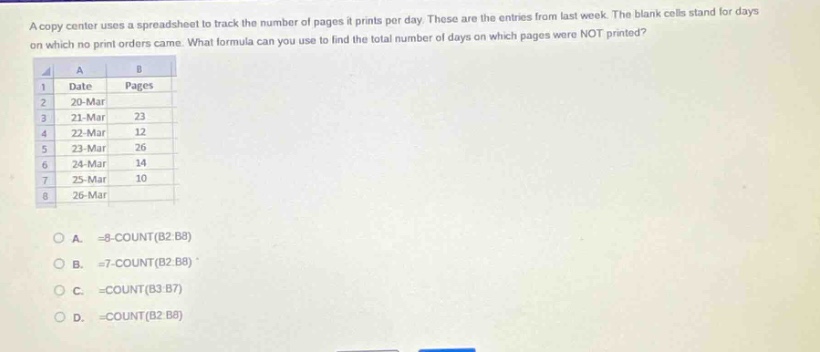
a copy center uses a spreadsheet to track the number of pages it prints per day. these are the entries from last week. the blank cells stand for days on which no print orders came. what formula can you use to find the total number of days on which pages were not printed?\na\tb\n1\tdate\tpages\n2\t20 - mar\t\n3\t21 - mar\t23\n4\t22 - mar\t12\n5\t23 - mar\t26\n6\t24 - mar\t14\n7\t25 - mar\t10\n8\t26 - mar\t\na. =8 - count(b2:b8)\nb. =7 - count(b2:b8)\nc. =count(b3:b7)\nd. =count(b2:b8)
Answer
Explanation:
Step1: Determine total days
There are 7 days in a week.
Step2: Find days with print orders
The COUNT function in spreadsheet counts the number of non - blank cells in the given range. Here the range of cells with page - print data is B2:B8. The number of days with print orders is COUNT(B2:B8).
Step3: Calculate days without print orders
To find the number of days on which pages were not printed, we subtract the number of days with print orders from the total number of days in a week. So the formula is =7 - COUNT(B2:B8).
Answer:
B. =7-COUNT(B2:B8)