an employer uses the spreadsheet below to determine the average hourly salary of her four employees. she…
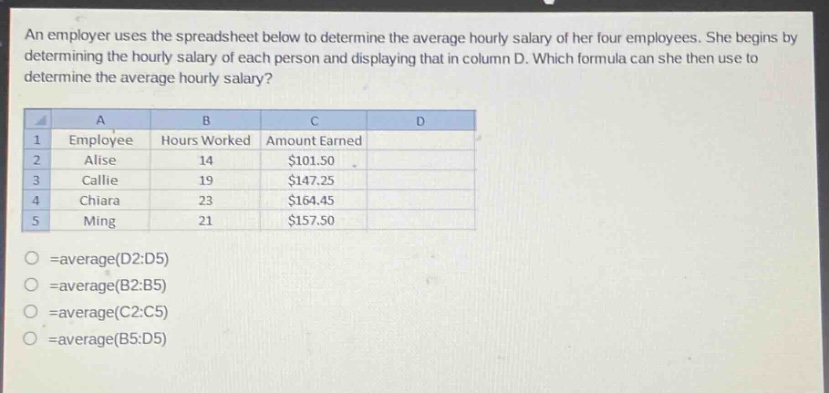
an employer uses the spreadsheet below to determine the average hourly salary of her four employees. she begins by determining the hourly salary of each person and displaying that in column d. which formula can she then use to determine the average hourly salary? a b c d 1 employee hours worked amount earned 2 alise 14 $101.50 3 callie 19 $147.25 4 chiara 23 $164.45 5 ming 21 $157.50 =average(d2:d5) =average(b2:b5) =average(c2:c5) =average(b5:d5)
Answer
Explanation:
Step1: Identify relevant data
The hourly - salary data is in column D (D2:D5).
Step2: Recall average formula in spreadsheet
In a spreadsheet, the formula to find the average of a range of cells is =average(range). Here the range for hourly - salary is D2:D5.
Answer:
=average(D2:D5)