imagine you are going to teach someone how to \surf the internet.\ determine the steps from the list…
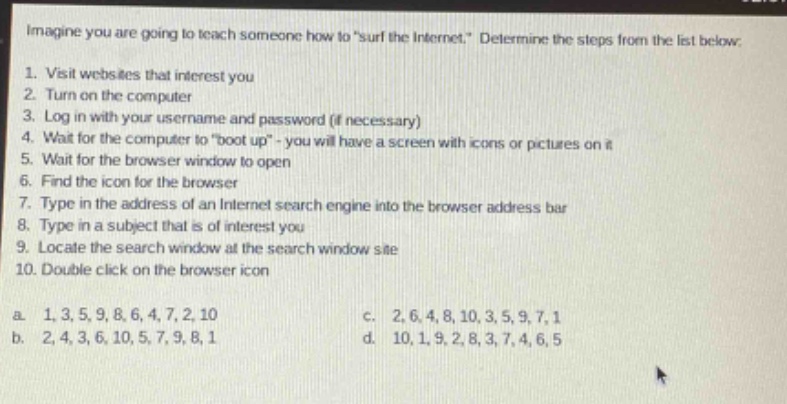
imagine you are going to teach someone how to \surf the internet.\ determine the steps from the list below:\n1. visit websites that interest you\n2. turn on the computer\n3. log in with your username and password (if necessary)\n4. wait for the computer to \boot up\ - you will have a screen with icons or pictures on it\n5. wait for the browser window to open\n6. find the icon for the browser\n7. type in the address of an internet search engine into the browser address bar\n8. type in a subject that is of interest you\n9. locate the search window at the search window site\n10. double - click on the browser icon\na. 1,3,5,9,8,6,4,7,2,10\nc. 2,6,4,8,10,3,5,9,7,1\nb. 2,4,3,6,10,5,7,9,8,1\nd. 10,1,9,2,8,3,7,4,6,5
Answer
Explanation:
Step1: Turn on the computer
First, power - on the computer (step 2).
Step2: Wait for boot - up
Then, wait for it to boot up (step 4).
Step3: Log in if needed
Log in with username and password if required (step 3).
Step4: Locate browser icon
Find the browser icon (step 6).
Step5: Open the browser
Double - click on the browser icon (step 10).
Step6: Wait for browser window
Wait for the browser window to open (step 5).
Step7: Enter search engine address
Type in the address of an Internet search engine into the browser address bar (step 7).
Step8: Locate search window
Locate the search window at the search window site (step 9).
Step9: Type in a subject
Type in a subject that is of interest (step 8).
Step10: Visit interesting websites
Visit websites that interest you (step 1). The correct order is 2, 4, 3, 6, 10, 5, 7, 9, 8, 1.
Answer:
b. 2, 4, 3, 6, 10, 5, 7, 9, 8, 1