using the dropdown arrows, add the code necessary to add a copyright symbol to the second to last line of…
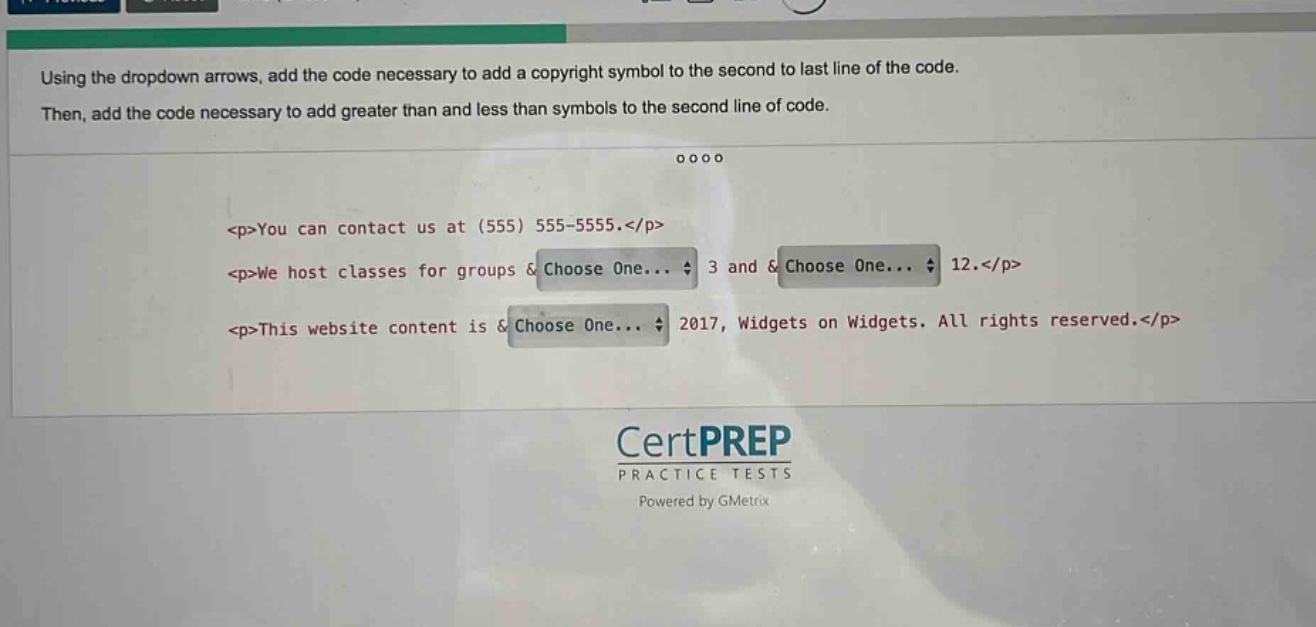
using the dropdown arrows, add the code necessary to add a copyright symbol to the second to last line of the code. then, add the code necessary to add greater than and less than symbols to the second line of code.\n<p>you can contact us at (555) 555 - 5555.</p>\n<p>we host classes for groups &choose one... 3 and &choose one... 12.</p>\n<p>this website content is &choose one... 2017, widgets on widgets. all rights reserved.</p>
Answer
Explanation:
Step1: Add copyright symbol code
In HTML, the copyright symbol entity is ©. So for the second - last line, the dropdown should be set to ©.
Step2: Add greater than and less than symbols code
In HTML, the less - than symbol entity is < and the greater - than symbol entity is >. For the second line, the first dropdown should be set to < and the second dropdown should be set to >.
Answer:
Second - last line dropdown: ©
Second line first dropdown: <
Second line second dropdown: >