which features were used to model the design in the advanced cad design 1 point lesson? sketch a triangle…
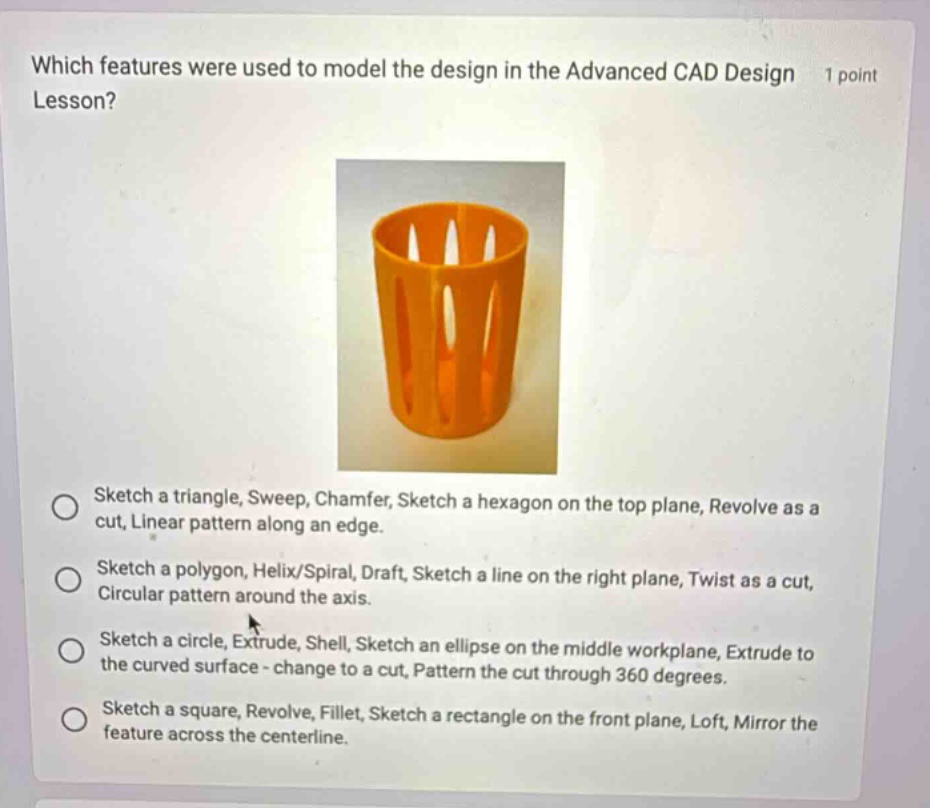
which features were used to model the design in the advanced cad design 1 point lesson? sketch a triangle, sweep, chamfer, sketch a hexagon on the top plane, revolve as a cut, linear pattern along an edge. sketch a polygon, helix/spiral, draft, sketch a line on the right plane, twist as a cut, circular pattern around the axis. sketch a circle, extrude, shell, sketch an ellipse on the middle workplane, extrude to the curved surface - change to a cut, pattern the cut through 360 degrees. sketch a square, revolve, fillet, sketch a rectangle on the front plane, loft, mirror the feature across the centerline.
Answer
Brief Explanations:
Without specific knowledge of the Advanced CAD Design Lesson, we must analyze each option based on typical CAD - modeling features. The cup - like shape with holes suggests features like sketching a basic shape (circle), extruding it to give it depth, shelling to make it hollow, and then creating and patterning cuts. Option C describes such a sequence of operations that are likely used to model the given design.
Answer:
Sketch a circle, Extrude, Shell, Sketch an ellipse on the middle workplane, Extrude to the curved surface - change to a cut, Pattern the cut through 360 degrees.