QUESTION IMAGE
Question
the microscope
critical thinking and review questions
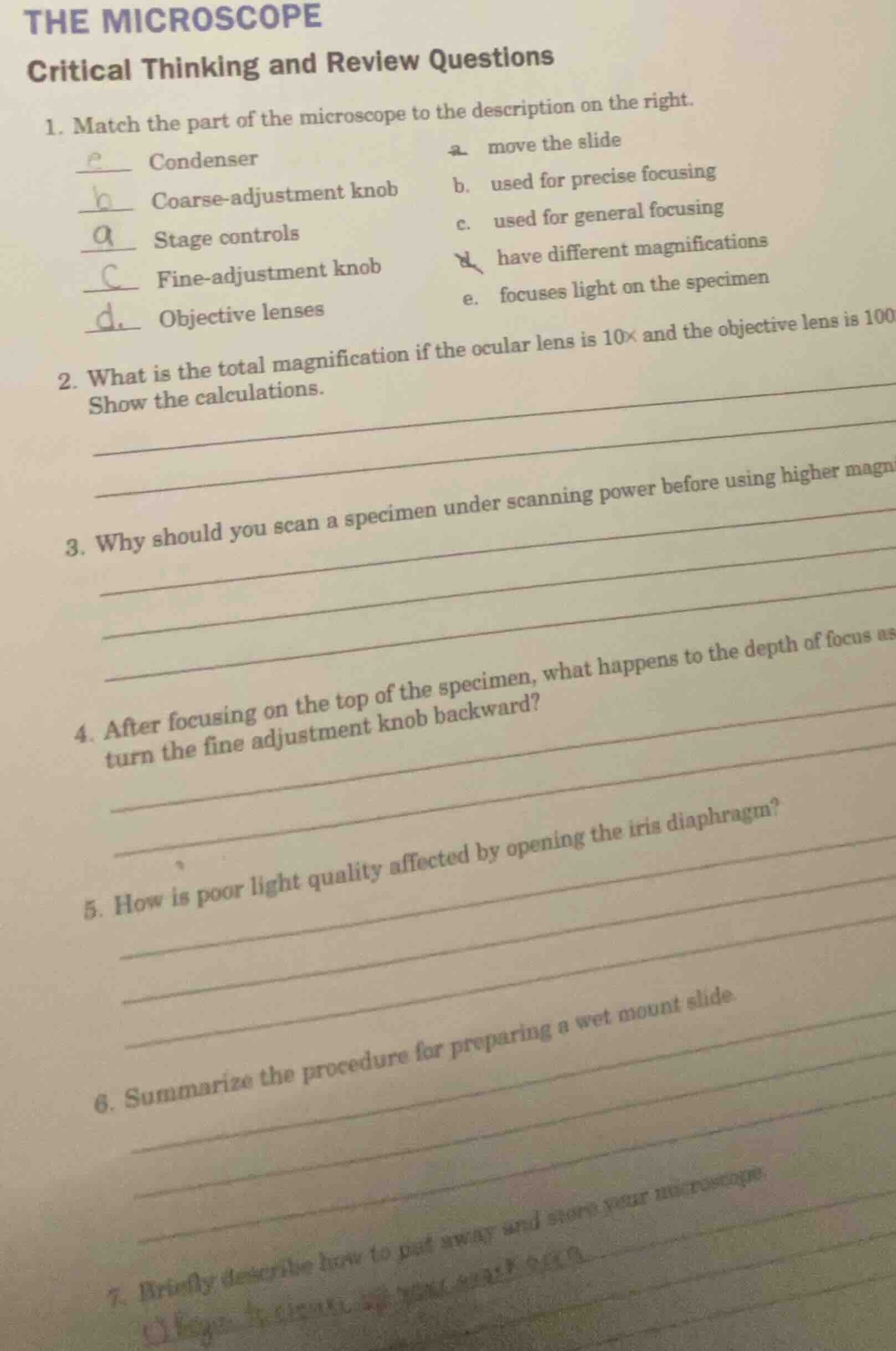
- match the part of the microscope to the description on the right.
e condenser a. move the slide
b coarse - adjustment knob b. used for precise focusing
a stage controls c. used for general focusing
c fine - adjustment knob d. have different magnifications
d objective lenses e. focuses light on the specimen
- what is the total magnification if the ocular lens is 10× and the objective lens is 100×? show the calculations.
- why should you scan a specimen under scanning power before using higher magnifications?
- after focusing on the top of the specimen, what happens to the depth of focus as you turn the fine adjustment knob backward?
- how is poor light quality affected by opening the iris diaphragm?
- summarize the procedure for preparing a wet mount slide.
- briefly describe how to put away and store your microscope.
Step1: Verify matching answers
- Condenser → e. focuses light on the specimen
- Coarse-adjustment knob → c. used for general focusing
- Stage controls → a. move the slide
- Fine-adjustment knob → b. used for precise focusing
- Objective lenses → d. have different magnifications
Step2: Calculate total magnification
Total magnification = ocular lens magnification × objective lens magnification
$\text{Total magnification} = 10\times \times 100\times = 1000\times$
Step3: Explain scanning first rationale
Scanning at low power first lets you locate the specimen easily (since the field of view is larger) before zooming in, preventing you from losing sight of the target when switching to higher magnification.
Step4: Explain fine focus backward effect
Turning the fine adjustment knob backward moves the objective lens away from the slide, so the depth of focus shifts to view deeper layers of the specimen below the top surface you initially focused on.
Step5: Explain iris diaphragm effect
Opening the iris diaphragm increases the amount of light passing through the specimen, which brightens the field of view and can improve resolution, reducing the "poor light quality" (dimness) that comes with a closed diaphragm.
Step6: Summarize wet mount procedure
- Add a small drop of liquid (water/solution) to a clean slide.
- Place the specimen into the liquid drop.
- Hold a coverslip by its edge, lower one side to the liquid drop at a 45° angle, then slowly lay it flat to avoid air bubbles.
- Blot excess liquid from the slide edges if needed.
Step7: Describe microscope storage steps
- Lower the stage/objective lens to its lowest position, set the objective to the lowest magnification (scanning power).
- Remove the slide from the stage.
- Clean all lenses with lens paper, and wipe down the stage/body with a soft cloth.
- Wrap the power cord neatly around the base.
- Place the microscope in its protective case or cover it with a dust cover, then store it in a dry, secure cabinet.

Snap & solve any problem in the app
Get step-by-step solutions on Sovi AI
Photo-based solutions with guided steps
Explore more problems and detailed explanations
1.
- Condenser: e. focuses light on the specimen
- Coarse-adjustment knob: c. used for general focusing
- Stage controls: a. move the slide
- Fine-adjustment knob: b. used for precise focusing
- Objective lenses: d. have different magnifications
- $1000\times$
- Scanning at low power first provides a larger field of view to easily locate the specimen, avoiding losing track of it when switching to higher magnification.
- Turning the fine adjustment knob backward shifts the depth of focus to view deeper layers of the specimen below the initially focused top surface.
- Opening the iris diaphragm increases light throughput, brightening the field of view and improving resolution, which corrects dim, poor-quality light.
- 1. Add a liquid drop to a clean slide; 2. Place specimen in the drop; 3. Lower a coverslip at a 45° angle over the drop to avoid air bubbles; 4. Blot excess liquid.
- 1. Lower the stage/objective to the lowest position, set to scanning power; 2. Remove the slide; 3. Clean lenses and body with appropriate materials; 4. Wrap the power cord; 5. Store in a case/cover in a dry, secure space.