QUESTION IMAGE
Question
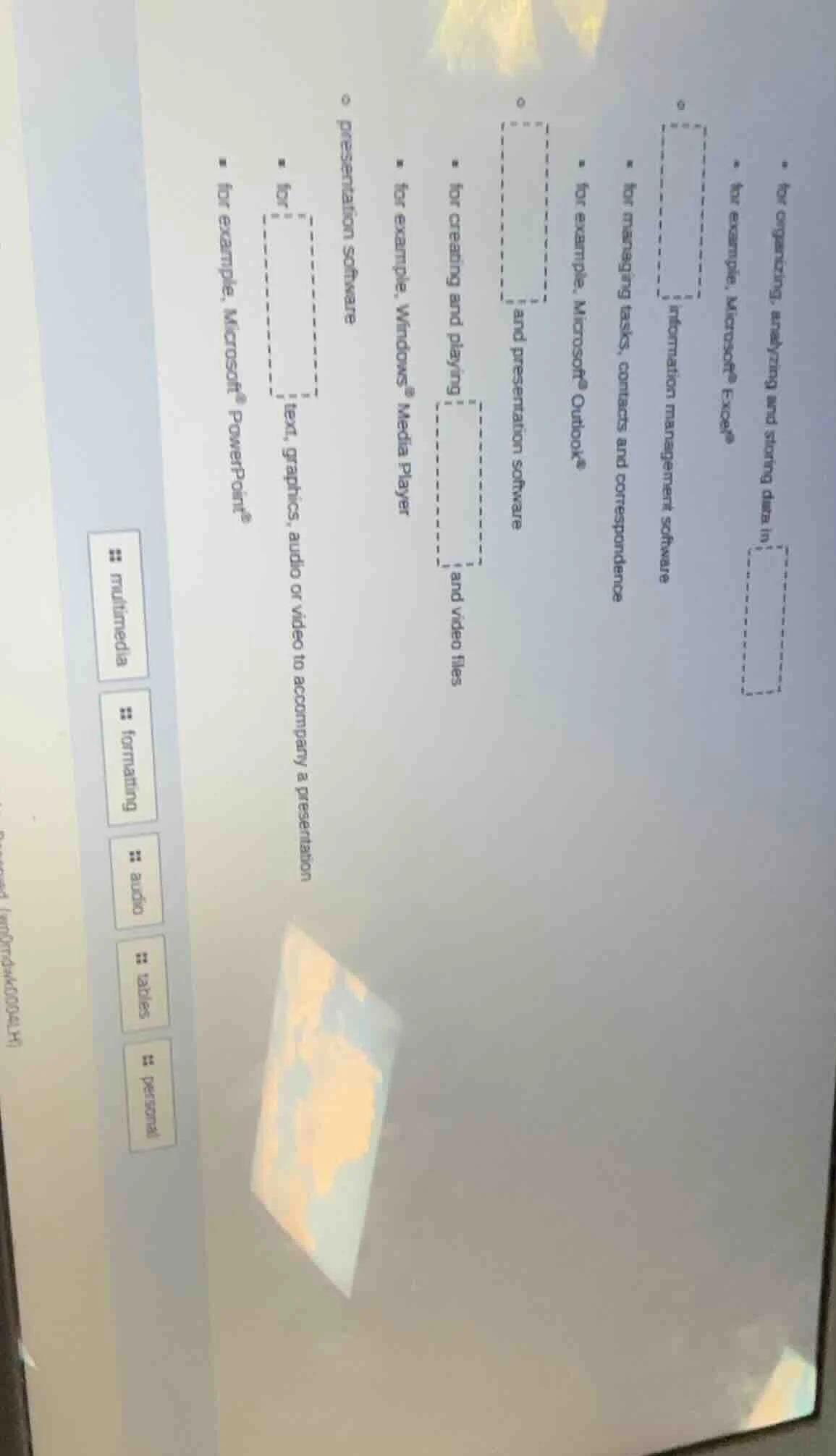
for organizing, analyzing and storing data in
for example, microsoft® excel®
information management software
for managing tasks, contacts and correspondence
for example, microsoft® outlook®
and presentation software
for creating and playing
and video files
for example, windows® media player
presentation software
for
text, graphics, audio or video to accompany a presentation
for example, microsoft® powerpoint®
multimedia
formatting
audio
tables
personal
To solve this, we analyze each dashed box based on the context:
1. First dashed box (for organizing, analyzing, storing data; example: Excel)
Excel is a spreadsheet software, so this box should relate to spreadsheets (since spreadsheets are used for organizing, analyzing, and storing data).
2. Second dashed box (information management; managing tasks, contacts, correspondence; example: Outlook)
Outlook is a personal information manager/email software, so this box relates to personal information management (or similar, but the key is it’s for managing personal info like tasks, contacts, emails).
3. Third dashed box (and presentation software)
Presentation software like PowerPoint is paired with what? The context for creating/playing audio and video files (Windows Media Player) is multimedia, but the “and presentation software” box—since presentation software is part of office productivity, but the other part (with Media Player) is for media. Wait, no—let's recheck:
- The “for creating and playing [ ] and video files” box: This is for audio (since it’s about audio and video files, and Media Player handles audio too).
- The “for [ ] text, graphics, audio or video to accompany a presentation” (example: PowerPoint) box: PowerPoint is for formatting/presenting, but the key here is multimedia? No, PowerPoint uses multimedia (text, graphics, audio, video) to accompany a presentation, but the label on the left is “multimedia”, “formatting”, “audio”, “tables”, “personal”. Wait, the left labels are options? Let's list the left buttons: multimedia, formatting, audio, tables, personal.
Let's map each dashed box:
- First (Excel: organize/analyze/store data) → spreadsheets (but left labels don’t have that. Wait, maybe the left labels are the answers? Wait, the left has “multimedia”, “formatting”, “audio”, “tables”, “personal”. Let's re-express:
- “for organizing, analyzing and storing data in [ ]” (Excel) → This is a spreadsheet, but left labels: maybe “tables”? No, Excel uses tables but is a spreadsheet. Wait, maybe the left labels are the fill - ins. Let's check each:
- “information management software for managing tasks, contacts and correspondence (Outlook)” → Outlook is personal information management, so “personal” (left label: personal).
- “for creating and playing [ ] and video files (Windows Media Player)” → Media Player plays audio and video, so “audio” (left label: audio).
- “[ ] and presentation software” → Presentation software (PowerPoint) and what? Maybe “multimedia”? No, the other part: “for [ ] text, graphics, audio or video to accompany a presentation (PowerPoint)” → PowerPoint is for formatting (text, graphics, etc.), so “formatting” (left label: formatting).
- “for [ ] text, graphics, audio or video to accompany a presentation (PowerPoint)” → “multimedia” (since it’s about combining text, graphics, audio, video—multimedia). Wait, this is confusing. Let's use the left labels as the answers:
Left labels: multimedia, formatting, audio, tables, personal.
- First dashed box (Excel: organize/analyze/store data) → Maybe “tables”? No, Excel uses tables but is a spreadsheet. Wait, the problem might be to match the left labels to the dashed boxes. Let's do that:
- “information management software (Outlook: manage tasks/contacts/correspondence)” → “personal” (personal information management).
- “for creating and playing [ ] and video files (Media Player)” → “audio” (plays audio and video).
- “[ ] and presentation software” → “multimedia”? No, presentation software and what? Wait, the “for […

Snap & solve any problem in the app
Get step-by-step solutions on Sovi AI
Photo-based solutions with guided steps
Explore more problems and detailed explanations
To solve this, we analyze each dashed box based on the context:
1. First dashed box (for organizing, analyzing, storing data; example: Excel)
Excel is a spreadsheet software, so this box should relate to spreadsheets (since spreadsheets are used for organizing, analyzing, and storing data).
2. Second dashed box (information management; managing tasks, contacts, correspondence; example: Outlook)
Outlook is a personal information manager/email software, so this box relates to personal information management (or similar, but the key is it’s for managing personal info like tasks, contacts, emails).
3. Third dashed box (and presentation software)
Presentation software like PowerPoint is paired with what? The context for creating/playing audio and video files (Windows Media Player) is multimedia, but the “and presentation software” box—since presentation software is part of office productivity, but the other part (with Media Player) is for media. Wait, no—let's recheck:
- The “for creating and playing [ ] and video files” box: This is for audio (since it’s about audio and video files, and Media Player handles audio too).
- The “for [ ] text, graphics, audio or video to accompany a presentation” (example: PowerPoint) box: PowerPoint is for formatting/presenting, but the key here is multimedia? No, PowerPoint uses multimedia (text, graphics, audio, video) to accompany a presentation, but the label on the left is “multimedia”, “formatting”, “audio”, “tables”, “personal”. Wait, the left labels are options? Let's list the left buttons: multimedia, formatting, audio, tables, personal.
Let's map each dashed box:
- First (Excel: organize/analyze/store data) → spreadsheets (but left labels don’t have that. Wait, maybe the left labels are the answers? Wait, the left has “multimedia”, “formatting”, “audio”, “tables”, “personal”. Let's re-express:
- “for organizing, analyzing and storing data in [ ]” (Excel) → This is a spreadsheet, but left labels: maybe “tables”? No, Excel uses tables but is a spreadsheet. Wait, maybe the left labels are the fill - ins. Let's check each:
- “information management software for managing tasks, contacts and correspondence (Outlook)” → Outlook is personal information management, so “personal” (left label: personal).
- “for creating and playing [ ] and video files (Windows Media Player)” → Media Player plays audio and video, so “audio” (left label: audio).
- “[ ] and presentation software” → Presentation software (PowerPoint) and what? Maybe “multimedia”? No, the other part: “for [ ] text, graphics, audio or video to accompany a presentation (PowerPoint)” → PowerPoint is for formatting (text, graphics, etc.), so “formatting” (left label: formatting).
- “for [ ] text, graphics, audio or video to accompany a presentation (PowerPoint)” → “multimedia” (since it’s about combining text, graphics, audio, video—multimedia). Wait, this is confusing. Let's use the left labels as the answers:
Left labels: multimedia, formatting, audio, tables, personal.
- First dashed box (Excel: organize/analyze/store data) → Maybe “tables”? No, Excel uses tables but is a spreadsheet. Wait, the problem might be to match the left labels to the dashed boxes. Let's do that:
- “information management software (Outlook: manage tasks/contacts/correspondence)” → “personal” (personal information management).
- “for creating and playing [ ] and video files (Media Player)” → “audio” (plays audio and video).
- “[ ] and presentation software” → “multimedia”? No, presentation software and what? Wait, the “for [ ] text, graphics, audio or video to accompany a presentation (PowerPoint)” → “formatting” (PowerPoint formats text, graphics, etc.).
- “for organizing, analyzing and storing data in [ ] (Excel)” → “tables” (Excel uses tables to organize data).
Wait, maybe the correct matches are:
- “for organizing, analyzing and storing data in [ ]” (Excel) → tables (Excel uses tables for data organization).
- “information management software for managing tasks, contacts and correspondence” (Outlook) → personal (Outlook is personal information management).
- “for creating and playing [ ] and video files” (Windows Media Player) → audio (Media Player plays audio and video).
- “[ ] and presentation software” → Wait, no, the “and presentation software” box—maybe “multimedia”? No, the “for [ ] text, graphics, audio or video to accompany a presentation” (PowerPoint) → multimedia (PowerPoint uses multimedia elements).
- “for [ ] text, graphics, audio or video to accompany a presentation” (PowerPoint) → formatting? No, formatting is about layout, but multimedia is about combining text, graphics, audio, video.
This is a bit unclear, but based on the left labels (multimedia, formatting, audio, tables, personal) and the contexts:
- Outlook (personal info management) → personal.
- Media Player (audio/video) → audio.
- PowerPoint (text, graphics, audio, video for presentation) → multimedia.
- Excel (data organization with tables) → tables.
- The “and presentation software” box—maybe the remaining label is formatting? No, formatting is about text/graphics layout.
Assuming the left labels are the answers, here are the likely fills:
- “for organizing, analyzing and storing data in [ ]” (Excel) → tables (left label: tables).
- “information management software for managing tasks, contacts and correspondence” (Outlook) → personal (left label: personal).
- “for creating and playing [ ] and video files” (Windows Media Player) → audio (left label: audio).
- “[ ] and presentation software” → multimedia (left label: multimedia).
- “for [ ] text, graphics, audio or video to accompany a presentation” (PowerPoint) → formatting (left label: formatting).
Final Answers (matching each dashed box with left labels):
- (Excel: organize/analyze/store data) → tables
- (Outlook: info management) → personal
- (create/play audio/video) → audio
- (and presentation software) → multimedia
- (accompany a presentation with text/graphics/audio/video) → formatting
(Note: The exact mapping depends on the intended context, but this is the most logical based on software functions and the left - side labels.)