QUESTION IMAGE
Question
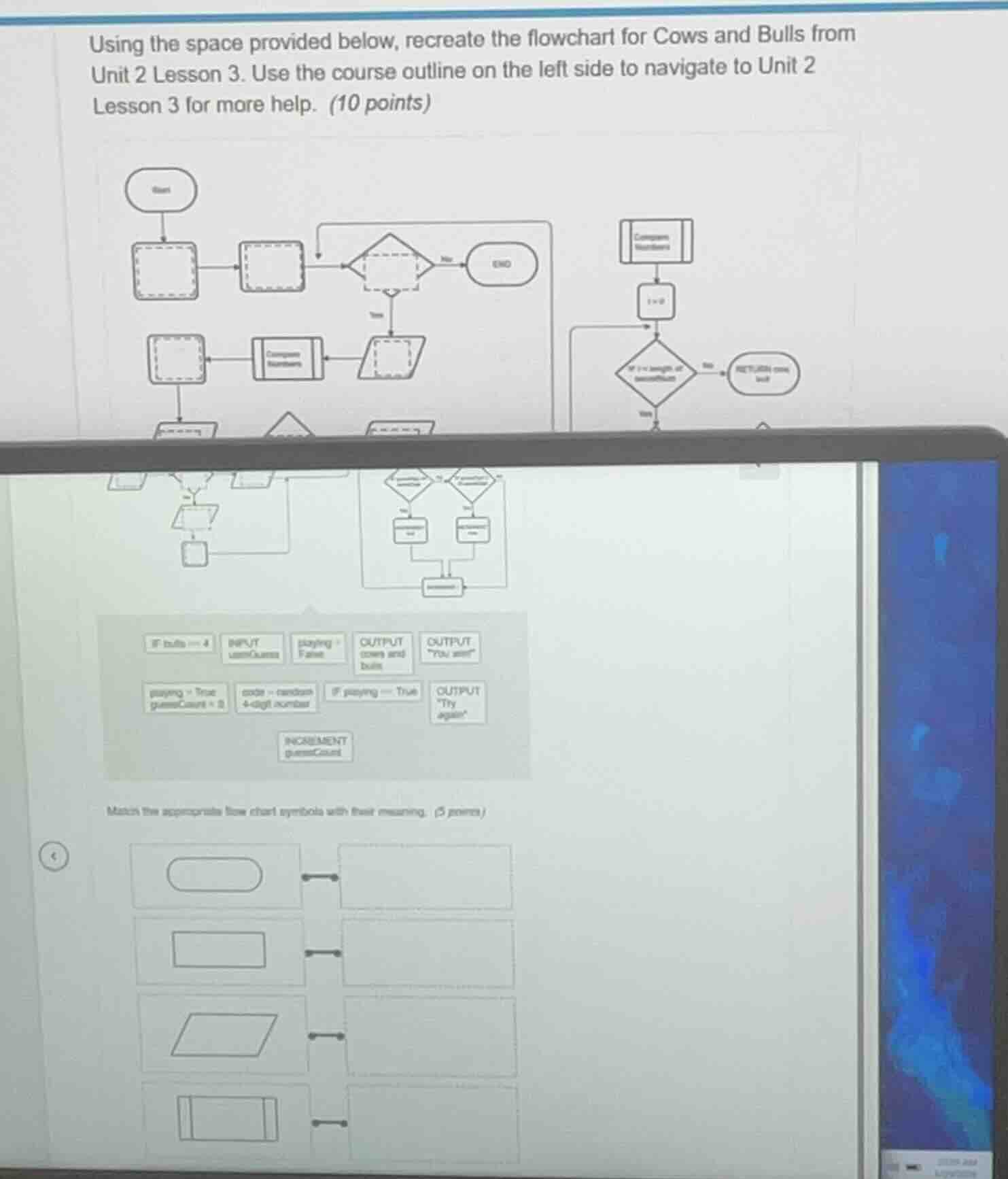
using the space provided below, recreate the flowchart for cows and bulls from unit 2 lesson 3. use the course outline on the left side to navigate to unit 2 lesson 3 for more help. (10 points)
match the appropriate flow chart symbols with their meaning. (5 points)
Response
To solve the flowchart recreation and symbol - matching for the Cows and Bulls game, we follow these steps:
Part 1: Recreating the Cows and Bulls Flowchart
Step 1: Initialize the game
- Explanation: Start the game by setting the initial conditions. We set the game - playing flag (
playing) toTrueand the game count (gameCount) to 0. Also, generate a random 4 - digit number as thecode. - Actions in Flowchart: Use a rectangular (process) symbol to represent
playing = True, gameCount = 0and another process symbol forcode = random 4 - digit number. The start symbol (oval) is already labeled "Start".
Step 2: Game loop start
- Explanation: Check if the game is still being played (i.e.,
playing = True). This is a decision (diamond) symbol. If the answer is "No", we end the game (using the "END" oval). If the answer is "Yes", we move to the next step. - Actions in Flowchart: Place a diamond symbol with the condition
If playing == True. Draw an arrow from the "Yes" branch to the next process.
Step 3: Get user guess
- Explanation: Take the user's guess as input. We use an input/output (parallelogram) symbol to represent
INPUT userGuess. - Actions in Flowchart: Add a parallelogram symbol labeled
INPUT userGuess.
Step 4: Compare numbers
- Explanation: Compare the user's guess with the generated code to calculate the number of cows and bulls. We use a rectangular (process) symbol for the "Compare Numbers" operation.
- Actions in Flowchart: Place a process symbol labeled
Compare Numbers.
Step 5: Output cows and bulls
- Explanation: Display the number of cows and bulls to the user. This is an input/output (parallelogram) symbol with the label
OUTPUT cows and bulls. - Actions in Flowchart: Add a parallelogram symbol labeled
OUTPUT cows and bulls.
Step 6: Check for win
- Explanation: Check if the number of bulls is 4 (which means the user has guessed the number correctly). This is a decision (diamond) symbol with the condition
If bulls == 4. - Actions in Flowchart: Place a diamond symbol with the condition
If bulls == 4. If the answer is "Yes", we setplaying = False(process symbol) and output "You win!" (parallelogram symbol). If the answer is "No", we increment the game count.
Step 7: Increment game count and check for replay
- Explanation: Increment the
gameCount(process symbol:INCREMENT gameCount). Then, check if the user wants to play again (decision symbol:If playing == False, OUTPUT "Try again?"and get user input for replay). If the user wants to play again, we setplaying = Trueand go back to the game loop start. If not, we end the game. - Actions in Flowchart: Add the necessary process, decision, and input/output symbols for these operations and connect the arrows according to the flow.
Part 2: Matching Flowchart Symbols with Meanings
- Oval (Start/End): Represents the start or end of the flowchart. In our case, it's used for "Start" and "END".
- Rectangle (Process): Represents a process or action, such as
playing = True, gameCount = 0,code = random 4 - digit number,INCREMENT gameCount, andplaying = False. - Parallelogram (Input/Output): Represents input or output operations, such as
INPUT userGuess,OUTPUT cows and bulls, andOUTPUT "You win!"/OUTPUT "Try again?". - Diamond (Decision): Represents a decision or conditional check, such as
If playing == True,If bulls == 4, and the replay check.
Final Flowchart Structure (Summary)
- Start (Oval)…

Snap & solve any problem in the app
Get step-by-step solutions on Sovi AI
Photo-based solutions with guided steps
Explore more problems and detailed explanations
(Flowchart Recreation and Symbol Matching)
Flowchart Recreation (Key Symbols and Flow)
- Start (Oval) → Process (
playing = True, gameCount = 0) → Process (code = random 4 - digit number) → Decision (If playing == True) → (Yes) Input (INPUT userGuess) → Process (Compare Numbers) → Output (OUTPUT cows and bulls) → Decision (If bulls == 4) → (Yes) Process (playing = False) → Output (OUTPUT "You win!") → (No) Process (INCREMENT gameCount) → Output (OUTPUT "Try again?") → (Replay) Process (playing = True) → back to Decision (If playing == True); (No Replay) End (Oval)
Symbol - Meaning Matching
- Oval: Start/End
- Rectangle: Process (e.g.,
playing = True, gameCount = 0,code = random 4 - digit number, etc.) - Parallelogram: Input/Output (e.g.,
INPUT userGuess,OUTPUT cows and bulls, etc.) - Diamond: Decision (e.g.,
If playing == True,If bulls == 4, etc.)