QUESTION IMAGE
Question
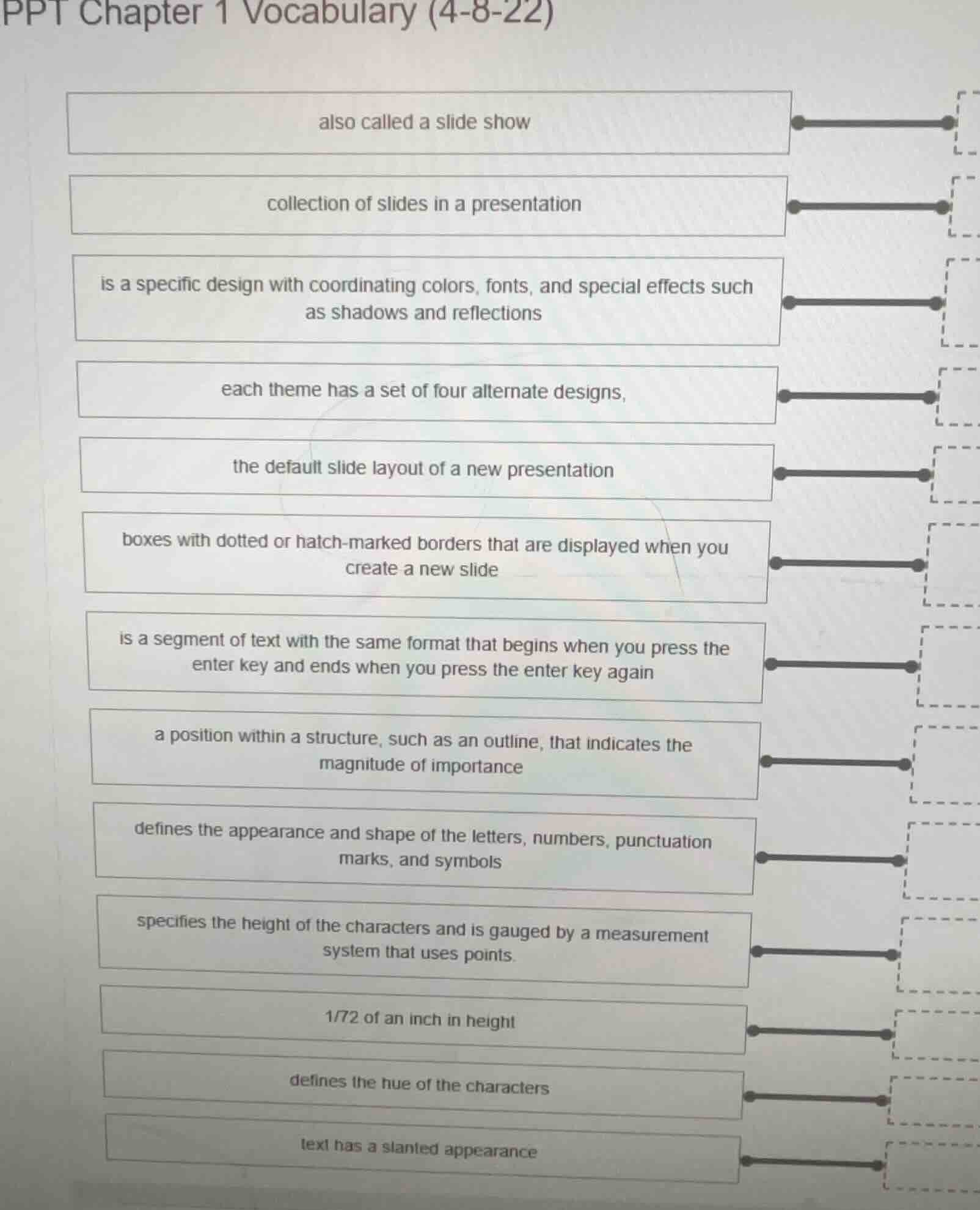
ppt chapter 1 vocabulary (4-8-22)
also called a slide show
collection of slides in a presentation
is a specific design with coordinating colors, fonts, and special effects such as shadows and reflections
each theme has a set of four alternate designs,
the default slide layout of a new presentation
boxes with dotted or hatch - marked borders that are displayed when you create a new slide
is a segment of text with the same format that begins when you press the enter key and ends when you press the enter key again
a position within a structure, such as an outline, that indicates the magnitude of importance
defines the appearance and shape of the letters, numbers, punctuation marks, and symbols
specifies the height of the characters and is gauged by a measurement system that uses points.
1/72 of an inch in height
defines the hue of the characters
text has a slanted appearance
Since the problem is about matching PPT (PowerPoint) vocabulary terms with their definitions (though the right - hand side of the match is cut off), we can identify the correct terms for each definition as follows:
Term - Definition Matches:
- Presentation (also called a slide show): A presentation in PowerPoint is also known as a slide show.
- Presentation (collection of slides in a presentation): A PowerPoint presentation is a collection of slides.
- Theme (is a specific design with coordinating colors, fonts, and special effects such as shadows and reflections): A theme in PowerPoint provides a consistent design with matching colors, fonts, and effects.
- Variants (each theme has a set of four alternate designs): Variants are the alternate designs that come with each theme.
- Title Slide (the default slide layout of a new presentation): When you create a new PowerPoint presentation, the default slide is the Title Slide.
- Placeholders (boxes with dotted or hatch - marked borders that are displayed when you create a new slide): Placeholders are the dotted - bordered boxes on a new slide where you can add content.
- Paragraph (is a segment of text with the same format that begins when you press the enter key and ends when you press the enter key again): In text formatting, a paragraph starts and ends with the Enter key press and has consistent formatting.
- Level (a position within a structure, such as an outline, that indicates the magnitude of importance): In an outline structure (like in PowerPoint's outline view), a level shows the importance of a text segment.
- Font (defines the appearance and shape of the letters, numbers, punctuation marks, and symbols): A font determines how characters look.
- Font Size (specifies the height of the characters and is gauged by a measurement system that uses points): Font size is the height of characters, measured in points.
- Point (1/72 of an inch in height): A point is a unit of measurement for font size, and 1 point is 1/72 of an inch.
- Font Color (defines the hue of the characters): Font color is the color of the text characters.
- Italic (text has a slanted appearance): Italic text is slanted.
If you want to match these terms to the right - hand side boxes (which are cut off in the image), you would draw a line from each term (left - hand box) to its corresponding definition's box on the right. For example, draw a line from "also called a slide show" to the box labeled "Presentation" (for the first definition), and so on for each of the above - matched terms and definitions.

Snap & solve any problem in the app
Get step-by-step solutions on Sovi AI
Photo-based solutions with guided steps
Explore more problems and detailed explanations
Since the problem is about matching PPT (PowerPoint) vocabulary terms with their definitions (though the right - hand side of the match is cut off), we can identify the correct terms for each definition as follows:
Term - Definition Matches:
- Presentation (also called a slide show): A presentation in PowerPoint is also known as a slide show.
- Presentation (collection of slides in a presentation): A PowerPoint presentation is a collection of slides.
- Theme (is a specific design with coordinating colors, fonts, and special effects such as shadows and reflections): A theme in PowerPoint provides a consistent design with matching colors, fonts, and effects.
- Variants (each theme has a set of four alternate designs): Variants are the alternate designs that come with each theme.
- Title Slide (the default slide layout of a new presentation): When you create a new PowerPoint presentation, the default slide is the Title Slide.
- Placeholders (boxes with dotted or hatch - marked borders that are displayed when you create a new slide): Placeholders are the dotted - bordered boxes on a new slide where you can add content.
- Paragraph (is a segment of text with the same format that begins when you press the enter key and ends when you press the enter key again): In text formatting, a paragraph starts and ends with the Enter key press and has consistent formatting.
- Level (a position within a structure, such as an outline, that indicates the magnitude of importance): In an outline structure (like in PowerPoint's outline view), a level shows the importance of a text segment.
- Font (defines the appearance and shape of the letters, numbers, punctuation marks, and symbols): A font determines how characters look.
- Font Size (specifies the height of the characters and is gauged by a measurement system that uses points): Font size is the height of characters, measured in points.
- Point (1/72 of an inch in height): A point is a unit of measurement for font size, and 1 point is 1/72 of an inch.
- Font Color (defines the hue of the characters): Font color is the color of the text characters.
- Italic (text has a slanted appearance): Italic text is slanted.
If you want to match these terms to the right - hand side boxes (which are cut off in the image), you would draw a line from each term (left - hand box) to its corresponding definition's box on the right. For example, draw a line from "also called a slide show" to the box labeled "Presentation" (for the first definition), and so on for each of the above - matched terms and definitions.