QUESTION IMAGE
Question
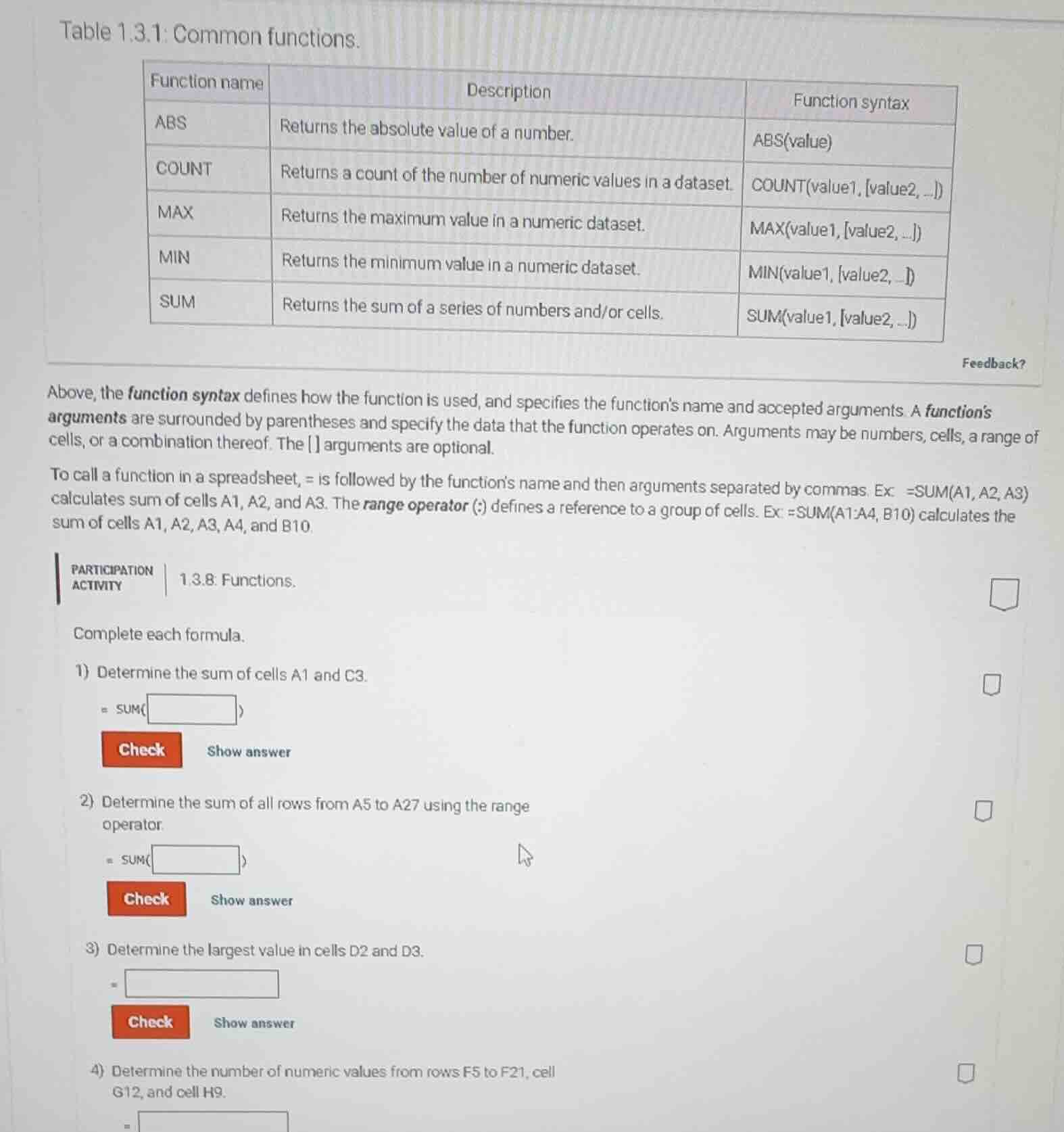
table 1.3.1: common functions.
| function name | description | function syntax |
|---|---|---|
| count | returns a count of the number of numeric values in a dataset. | count(value1, value2, ...) |
| max | returns the maximum value in a numeric dataset. | max(value1, value2, ...) |
| min | returns the minimum value in a numeric dataset. | min(value1, value2, ...) |
| sum | returns the sum of a series of numbers and/or cells. | sum(value1, value2, ...) |
above, the function syntax defines how the function is used, and specifies the functions name and accepted arguments. a functions arguments are surrounded by parentheses and specify the data that the function operates on. arguments may be numbers, cells, a range of cells, or a combination thereof. the arguments are optional.
to call a function in a spreadsheet, = is followed by the functions name and then arguments separated by commas. ex: =sum(a1, a2, a3) calculates sum of cells a1, a2, and a3. the range operator (:) defines a reference to a group of cells. ex: =sum(a1:a4, b10) calculates the sum of cells a1, a2, a3, a4, and b10.
participation activity 1.3.8: functions.
complete each formula.
- determine the sum of cells a1 and c3.
= sum(□)
check show answer
- determine the sum of all rows from a5 to a27 using the range operator.
= sum(□)
check show answer
- determine the largest value in cells d2 and d3.
= □
check show answer
- determine the number of numeric values from rows f5 to f21, cell g12, and cell h9.
= □
Step1: Fill SUM arguments for A1,C3
=SUM(A1, C3)
Step2: Fill SUM range for A5:A27
=SUM(A5:A27)
Step3: Use MAX for D2,D3
=MAX(D2, D3)
Step4: Use COUNT for range+cells
=COUNT(F5:F21, G12, H9)

Snap & solve any problem in the app
Get step-by-step solutions on Sovi AI
Photo-based solutions with guided steps
Explore more problems and detailed explanations
- =SUM(A1, C3)
- =SUM(A5:A27)
- =MAX(D2, D3)
- =COUNT(F5:F21, G12, H9)