QUESTION IMAGE
Question
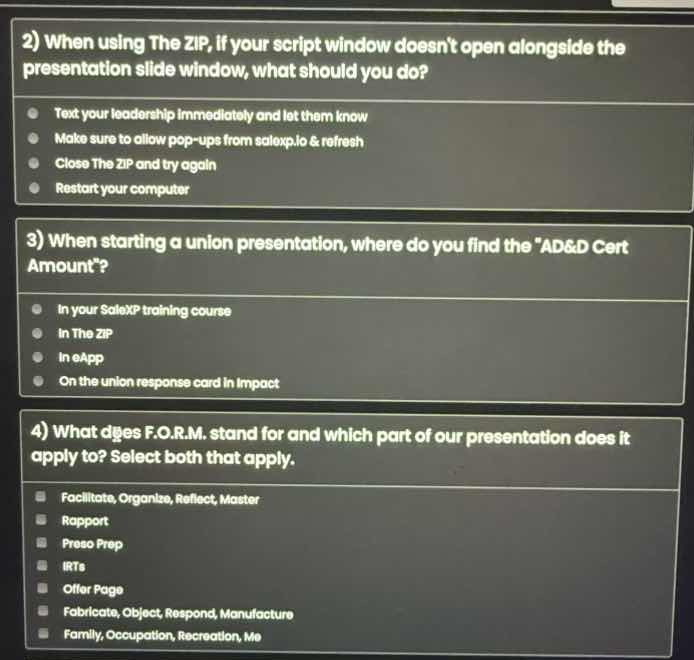
- when using the zip, if your script window doesnt open alongside the presentation slide window, what should you do?
- text your leadership immediately and let them know
- make sure to allow pop - ups from salexp.io & refresh
- close the zip and try again
- restart your computer
- when starting a union presentation, where do you find the \ad&d cert amount\?
- in your salexp training course
- in the zip
- in eapp
- on the union response card in impact
- what does f.o.r.m. stand for and which part of our presentation does it apply to? select both that apply.
- facilitate, organize, reflect, master
- rapport
- preso prep
- irts
- offer page
- fabricate, object, respond, manufacture
- family, occupation, recreation, me
Question 2
To resolve the script window not opening in The ZIP, allowing pop - ups from the relevant domain (salaxp.io) and refreshing is a common web - related fix for such issues. Texting leadership immediately is not a direct fix, closing and trying again or restarting the computer are more drastic and less likely the first step.
For a union presentation, the "AD&D Cert Amount" is typically found on the union response card in Impact. The SaleXP training course is for training, The ZIP and eApp are not the usual places for this specific amount.
F.O.R.M. stands for Family, Occupation, Recreation, Me. It is used for building Rapport in a presentation. The other options like Facilitate, Organize, Reflect, Master; Fabricate, Object, Respond, Manufacture are incorrect expansions. And it doesn't apply to Presso Prep or IRTs or Offer Page.

Snap & solve any problem in the app
Get step-by-step solutions on Sovi AI
Photo-based solutions with guided steps
Explore more problems and detailed explanations
B. Make sure to allow pop - ups from salaxp.io & refresh