QUESTION IMAGE
Question
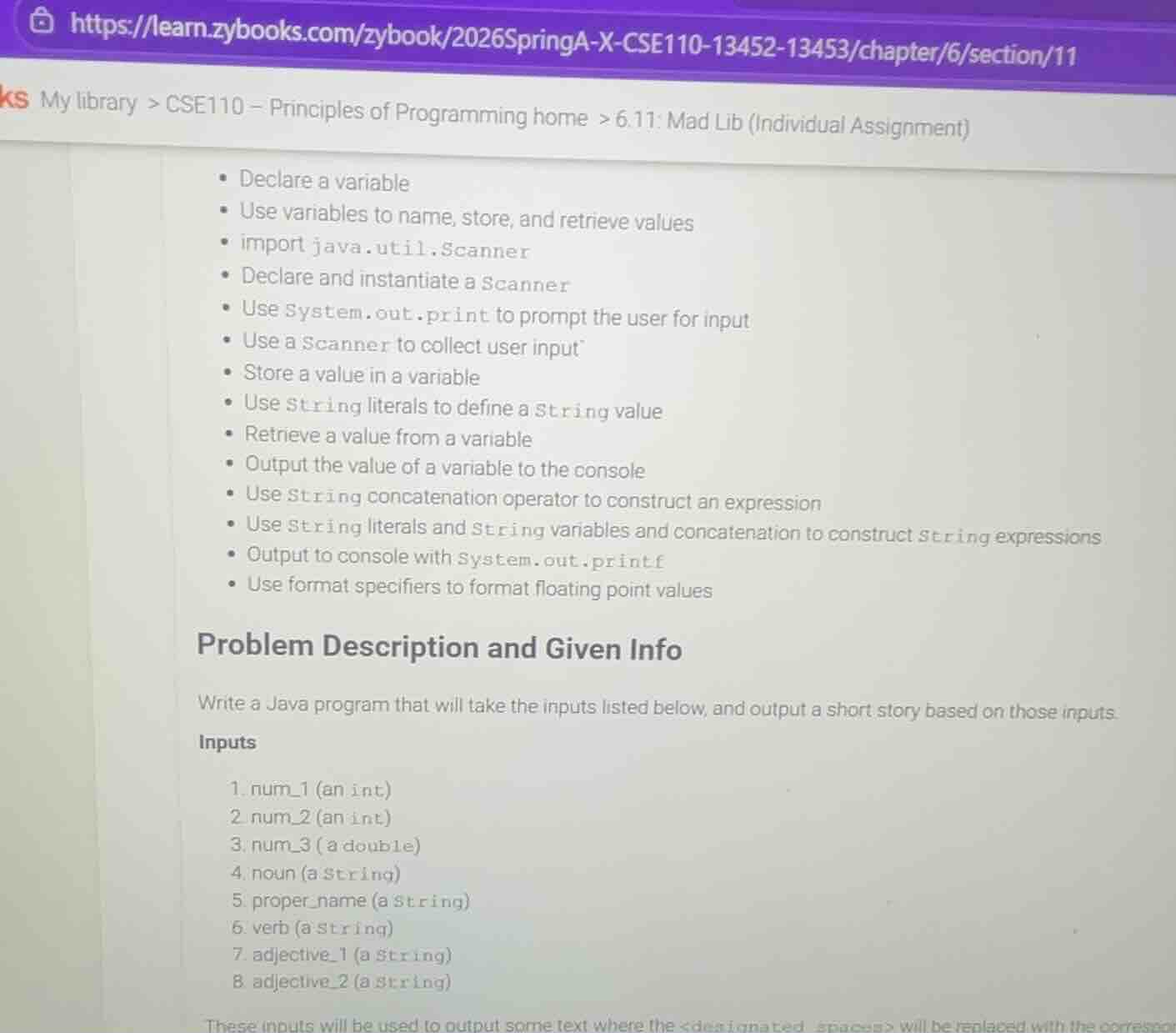
declare a variable
use variables to name, store, and retrieve values
import java.util.scanner
declare and instantiate a scanner
use system.out.print to prompt the user for input
use a scanner to collect user input
store a value in a variable
use string literals to define a string value
retrieve a value from a variable
output the value of a variable to the console
use string concatenation operator to construct an expression
use string literals and string variables and concatenation to construct string expressions
output to console with system.out.printf
use format specifiers to format floating point values
problem description and given info
write a java program that will take the inputs listed below, and output a short story based on those inputs.
inputs
- num_1 (an int)
- num_2 (an int)
- num_3 (a double)
- noun (a string)
- proper_name (a string)
- verb (a string)
- adjective_1 (a string)
- adjective_2 (a string)
these inputs will be used to output some text where the <designated spaces> will be replaced with the correspon
Step1: Import Scanner class
import java.util.Scanner;Step2: Main class and method setup
public class MadLib {
    public static void main(String[] args) {
Step3: Instantiate Scanner object
Scanner input = new Scanner(System.in);Step4: Collect int input num_1
        System.out.print("Enter an integer (num_1): ");
        int num_1 = input.nextInt();
        input.nextLine(); // Clear newline buffer
Step5: Collect int input num_2
        System.out.print("Enter an integer (num_2): ");
        int num_2 = input.nextInt();
        input.nextLine(); // Clear newline buffer
Step6: Collect double input num_3
        System.out.print("Enter a decimal (num_3): ");
        double num_3 = input.nextDouble();
        input.nextLine(); // Clear newline buffer
Step7: Collect string input noun
        System.out.print("Enter a noun: ");
        String noun = input.nextLine();
Step8: Collect string input proper_name
        System.out.print("Enter a proper name: ");
        String proper_name = input.nextLine();
Step9: Collect string input verb
        System.out.print("Enter a verb: ");
        String verb = input.nextLine();
Step10: Collect string input adjective_1
        System.out.print("Enter an adjective (1): ");
        String adjective_1 = input.nextLine();
Step11: Collect string input adjective_2
        System.out.print("Enter an adjective (2): ");
        String adjective_2 = input.nextLine();
Step12: Close Scanner
input.close();Step13: Build & print story
        String story = "One day, " + proper_name + " decided to " + verb + " for " + num_1 + " hours to find a "
                + adjective_1 + " " + noun + ". After traveling " + num_2 + " miles, they found it sitting on a "
                + adjective_2 + " rock that weighed " + String.format("%.2f", num_3) + " pounds!";
        System.out.println("
" + story);
    }
}
Snap & solve any problem in the app
Get step-by-step solutions on Sovi AI
Photo-based solutions with guided steps
Explore more problems and detailed explanations
The complete Java program above collects all required user inputs, then constructs and prints a formatted Mad Lib story using string concatenation and floating-point formatting. When run, it prompts the user for each input, then outputs a coherent short story with the substituted values.