QUESTION IMAGE
Question
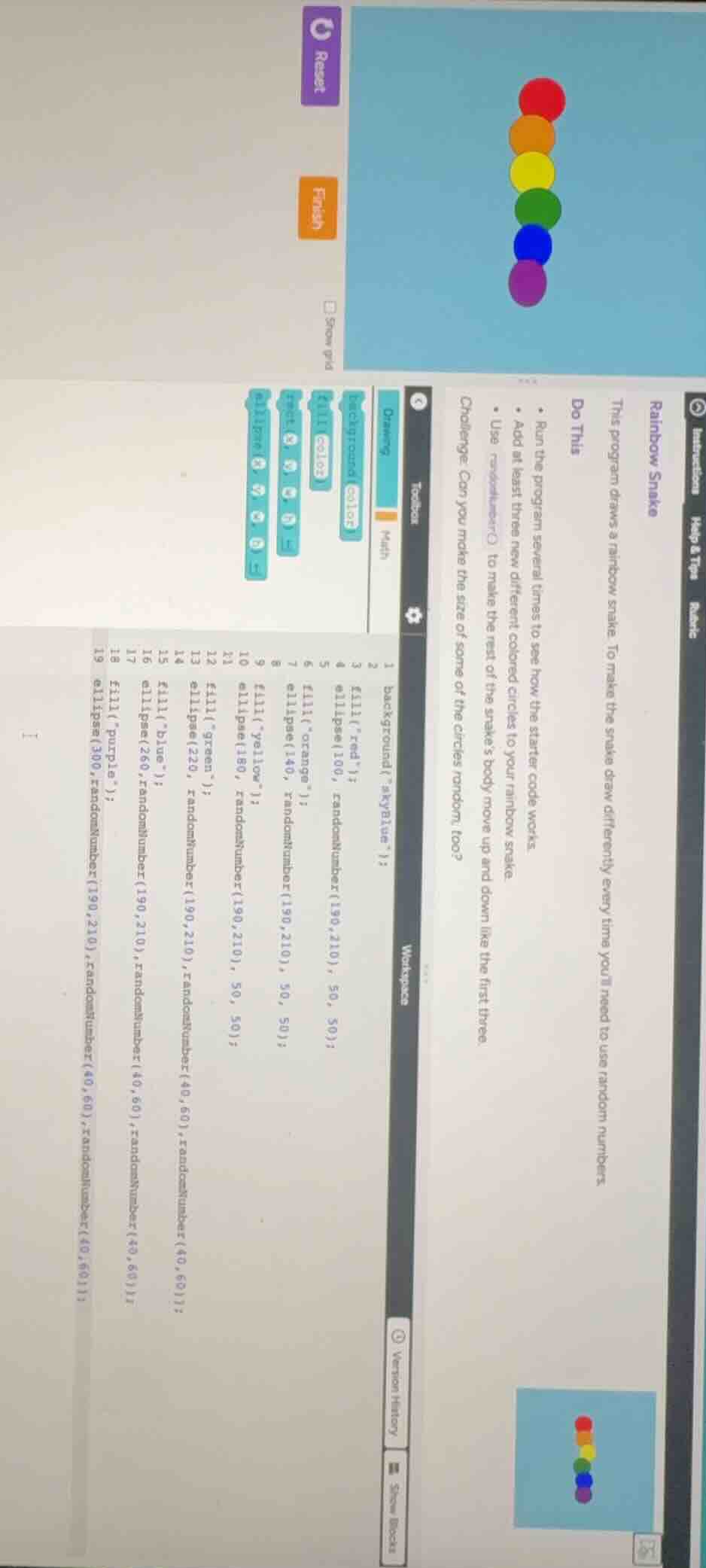
rainbow snake this program draws a rainbow snake. to make the snake draw differently every time youll need to use random numbers. do this - run the program several times to see how the starter code works. - add at least three new different colored circles to your rainbow snake. - use randomnumber() to make the rest of the snake’s body move up and down like the first three. challenge: can you make the size of some of the circles random, too? interactions help & tips rubric
To solve the challenge of making the size of some circles random and the snake's body move up/down, follow these steps:
Step 1: Understand the Starter Code
The original code uses ellipse() with fixed or partially random parameters. For example, ellipse(100, randomNumber(190,210), 50, 50); has fixed width/height (50,50).
Step 2: Make Circle Sizes Random
For each ellipse() call, replace the fixed width/height (e.g., 50,50) with randomNumber(min, max) to generate random sizes.
- Example for the red circle:
Original: ellipse(100, randomNumber(190,210), 50, 50);
Modified: ellipse(100, randomNumber(190,210), randomNumber(30,70), randomNumber(30,70));
Step 3: Make the Snake’s Body Move Up/Down
Use randomNumber() for the y-coordinate to shift the entire snake (or parts) up/down.
- For the orange circle (original
y=140):
Modified: ellipse(140, randomNumber(170,190), randomNumber(30,70), randomNumber(30,70));
- For the yellow circle (original
y=180):
Modified: ellipse(180, randomNumber(200,220), randomNumber(30,70), randomNumber(30,70));
Step 4: Add New Colored Circles
Create at least three new ellipse() calls with random positions, sizes, and colors.
- Example new circle (pink):
fill("pink");ellipse(randomNumber(80,120), randomNumber(220,240), randomNumber(30,70), randomNumber(30,70));
Step 5: Run and Test
Execute the modified code multiple times to verify:
- Circle sizes are random (width/height vary).
- The snake’s body (y-coordinates) shifts up/down.
- New colored circles are added.
Final Code (Example Structure)
background("skyBlue");
fill("red");
ellipse(100, randomNumber(190,210), randomNumber(30,70), randomNumber(30,70));

fill("orange");
ellipse(140, randomNumber(170,190), randomNumber(30,70), randomNumber(30,70));

fill("yellow");
ellipse(180, randomNumber(200,220), randomNumber(30,70), randomNumber(30,70));

# Add 3+ new circles (e.g., green, blue, pink)
fill("green");
ellipse(220, randomNumber(190,210), randomNumber(30,70), randomNumber(30,70));

fill("blue");
ellipse(260, randomNumber(170,190), randomNumber(30,70), randomNumber(30,70));

fill("pink");
ellipse(randomNumber(80,120), randomNumber(220,240), randomNumber(30,70), randomNumber(30,70));

# Continue modifying other circles (purple, etc.) with random y and size
Key Concepts Used
randomNumber(min, max): Generates a random integer betweenminandmax(inclusive).ellipse(x, y, width, height): Draws an ellipse (circle) at(x,y)withwidthandheight.
By randomizing the width, height, and y-coordinate of ellipse() calls, the snake’s body moves up/down, and circle sizes vary randomly.

Snap & solve any problem in the app
Get step-by-step solutions on Sovi AI
Photo-based solutions with guided steps
Explore more problems and detailed explanations
To solve the challenge of making the size of some circles random and the snake's body move up/down, follow these steps:
Step 1: Understand the Starter Code
The original code uses ellipse() with fixed or partially random parameters. For example, ellipse(100, randomNumber(190,210), 50, 50); has fixed width/height (50,50).
Step 2: Make Circle Sizes Random
For each ellipse() call, replace the fixed width/height (e.g., 50,50) with randomNumber(min, max) to generate random sizes.
- Example for the red circle:
Original: ellipse(100, randomNumber(190,210), 50, 50);
Modified: ellipse(100, randomNumber(190,210), randomNumber(30,70), randomNumber(30,70));
Step 3: Make the Snake’s Body Move Up/Down
Use randomNumber() for the y-coordinate to shift the entire snake (or parts) up/down.
- For the orange circle (original
y=140):
Modified: ellipse(140, randomNumber(170,190), randomNumber(30,70), randomNumber(30,70));
- For the yellow circle (original
y=180):
Modified: ellipse(180, randomNumber(200,220), randomNumber(30,70), randomNumber(30,70));
Step 4: Add New Colored Circles
Create at least three new ellipse() calls with random positions, sizes, and colors.
- Example new circle (pink):
fill("pink");ellipse(randomNumber(80,120), randomNumber(220,240), randomNumber(30,70), randomNumber(30,70));
Step 5: Run and Test
Execute the modified code multiple times to verify:
- Circle sizes are random (width/height vary).
- The snake’s body (y-coordinates) shifts up/down.
- New colored circles are added.
Final Code (Example Structure)
background("skyBlue");
fill("red");
ellipse(100, randomNumber(190,210), randomNumber(30,70), randomNumber(30,70));

fill("orange");
ellipse(140, randomNumber(170,190), randomNumber(30,70), randomNumber(30,70));

fill("yellow");
ellipse(180, randomNumber(200,220), randomNumber(30,70), randomNumber(30,70));

# Add 3+ new circles (e.g., green, blue, pink)
fill("green");
ellipse(220, randomNumber(190,210), randomNumber(30,70), randomNumber(30,70));

fill("blue");
ellipse(260, randomNumber(170,190), randomNumber(30,70), randomNumber(30,70));

fill("pink");
ellipse(randomNumber(80,120), randomNumber(220,240), randomNumber(30,70), randomNumber(30,70));

# Continue modifying other circles (purple, etc.) with random y and size
Key Concepts Used
randomNumber(min, max): Generates a random integer betweenminandmax(inclusive).ellipse(x, y, width, height): Draws an ellipse (circle) at(x,y)withwidthandheight.
By randomizing the width, height, and y-coordinate of ellipse() calls, the snake’s body moves up/down, and circle sizes vary randomly.