QUESTION IMAGE
Question
describing how to access the formula dialog box
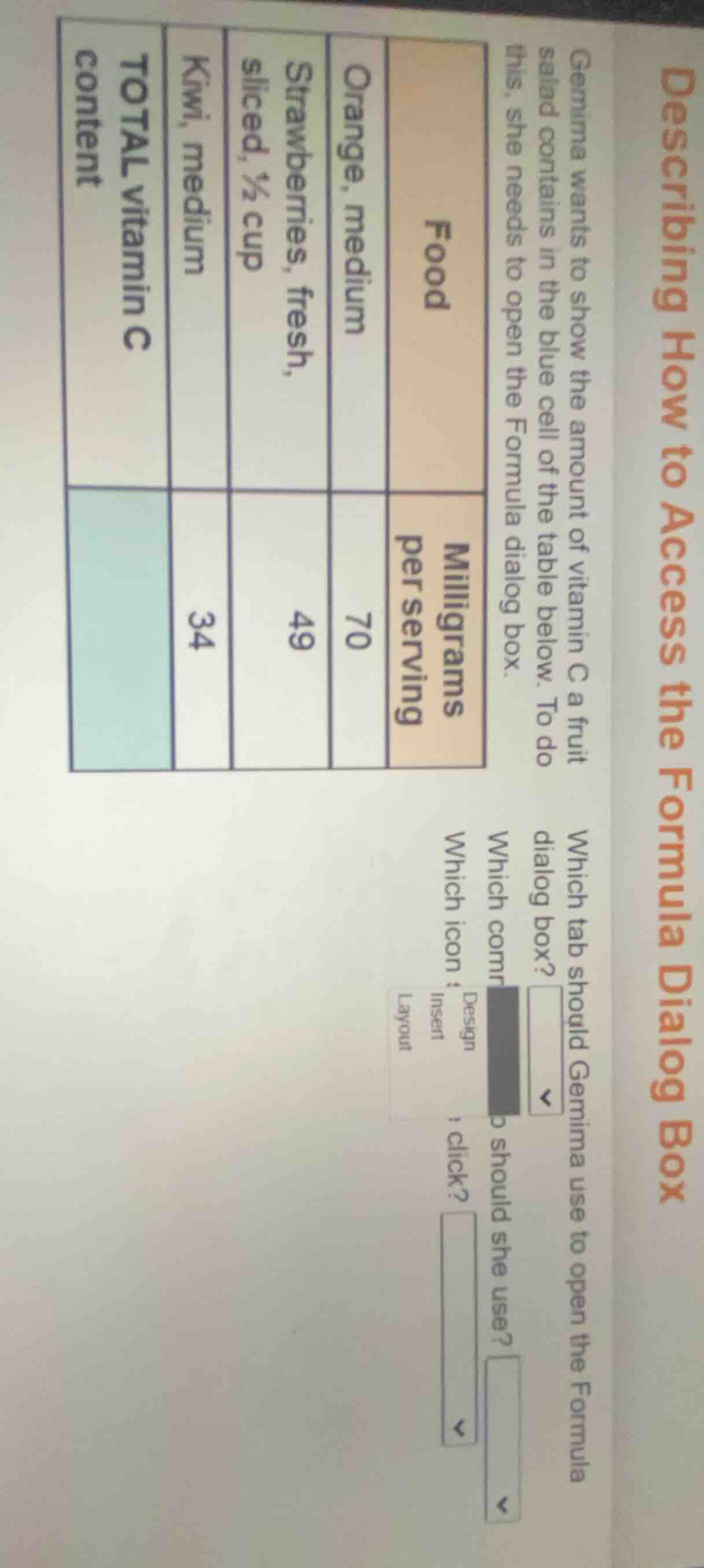
gemima wants to show the amount of vitamin c a fruit salad contains in the blue cell of the table below. to do this, she needs to open the formula dialog box.
| food | milligrams per serving | ---- | ---- | orange, medium | 70 | strawberries, fresh, sliced, ½ cup | 49 | kiwi, medium | 34 | total vitamin c content | which tab should gemima use to open the formula dialog box? $\boldsymbol{downarrow}$which command should she use? $\boldsymbol{downarrow}$which icon should she click? $\boldsymbol{downarrow}$options: design, insert, layout |
This is about using spreadsheet software to calculate total vitamin C. To open the Formula dialog box, the relevant tab for data calculations and formulas is the Layout tab (in some spreadsheet/table tools, this tab houses formula functions for tables). The command to use is Formula (to access the formula dialog for summing values), and the icon to click is the dedicated Formula icon (often represented by a sigma ∑ or "fx" symbol, linked to the formula dialog).

Snap & solve any problem in the app
Get step-by-step solutions on Sovi AI
Photo-based solutions with guided steps
Explore more problems and detailed explanations
- Which tab should Gemima use to open the Formula dialog box? Layout
- Which command should she use? Formula
- Which icon should she click? Formula (or the fx/∑ formula icon)