QUESTION IMAGE
Question
adobe photoshop workspace vocabulary
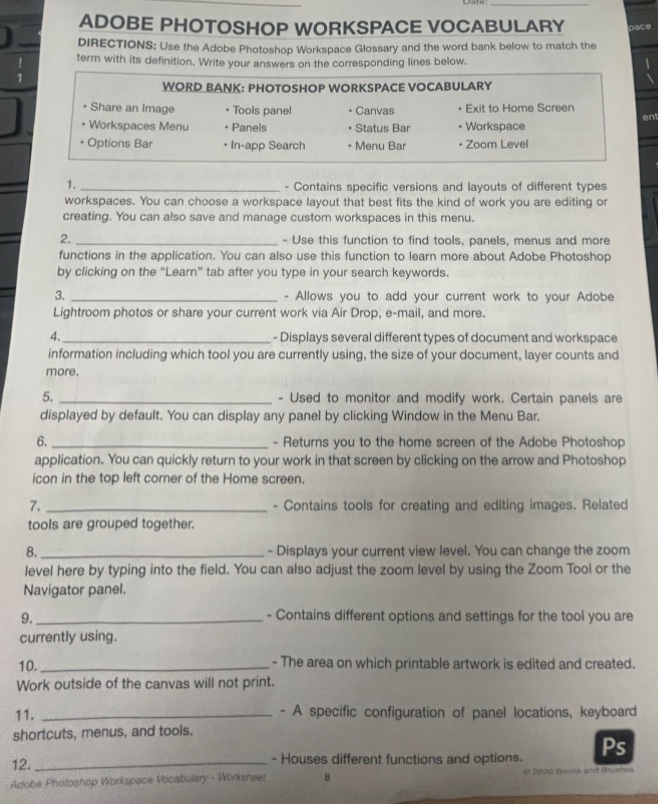
directions: use the adobe photoshop workspace glossary and the word bank below to match the term with its definition. write your answers on the corresponding lines below.
word bank: photoshop workspace vocabulary
- share an image
- tools panel
- canvas
- exit to home screen
- workspaces menu
- panels
- status bar
- workspace
- options bar
- in-app search
- menu bar
- zoom level
- __________________ - contains specific versions and layouts of different types workspaces. you can choose a workspace layout that best fits the kind of work you are editing or creating. you can also save and manage custom workspaces in this menu.
- __________________ - use this function to find tools, panels, menus and more functions in the application. you can also use this function to learn more about adobe photoshop by clicking on the \learn\ tab after you type in your search keywords.
- __________________ - allows you to add your current work to your adobe lightroom photos or share your current work via air drop, e-mail, and more.
- __________________ - displays several different types of document and workspace information including which tool you are currently using, the size of your document, layer counts and more.
- __________________ - used to monitor and modify work. certain panels are displayed by default. you can display any panel by clicking window in the menu bar.
- __________________ - returns you to the home screen of the adobe photoshop application. you can quickly return to your work in that screen by clicking on the arrow and photoshop icon in the top left corner of the home screen.
- __________________ - contains tools for creating and editing images. related tools are grouped together.
- __________________ - displays your current view level. you can change the zoom level here by typing into the field. you can also adjust the zoom level by using the zoom tool or the navigator panel.
- __________________ - contains different options and settings for the tool you are currently using.
- __________________ - the area on which printable artwork is edited and created. work outside of the canvas will not print.
- __________________ - a specific configuration of panel locations, keyboard shortcuts, menus, and tools.
- __________________ - houses different functions and options.
Brief Explanations
Each term is matched to its definition by cross-referencing the functions of Adobe Photoshop workspace components with the provided word bank.

Snap & solve any problem in the app
Get step-by-step solutions on Sovi AI
Photo-based solutions with guided steps
Explore more problems and detailed explanations
- Workspaces Menu
- In-app Search
- Share an Image
- Status Bar
- Panels
- Exit to Home Screen
- Tools panel
- Zoom Level
- Options Bar
- Canvas
- Workspace
- Menu Bar