QUESTION IMAGE
Question
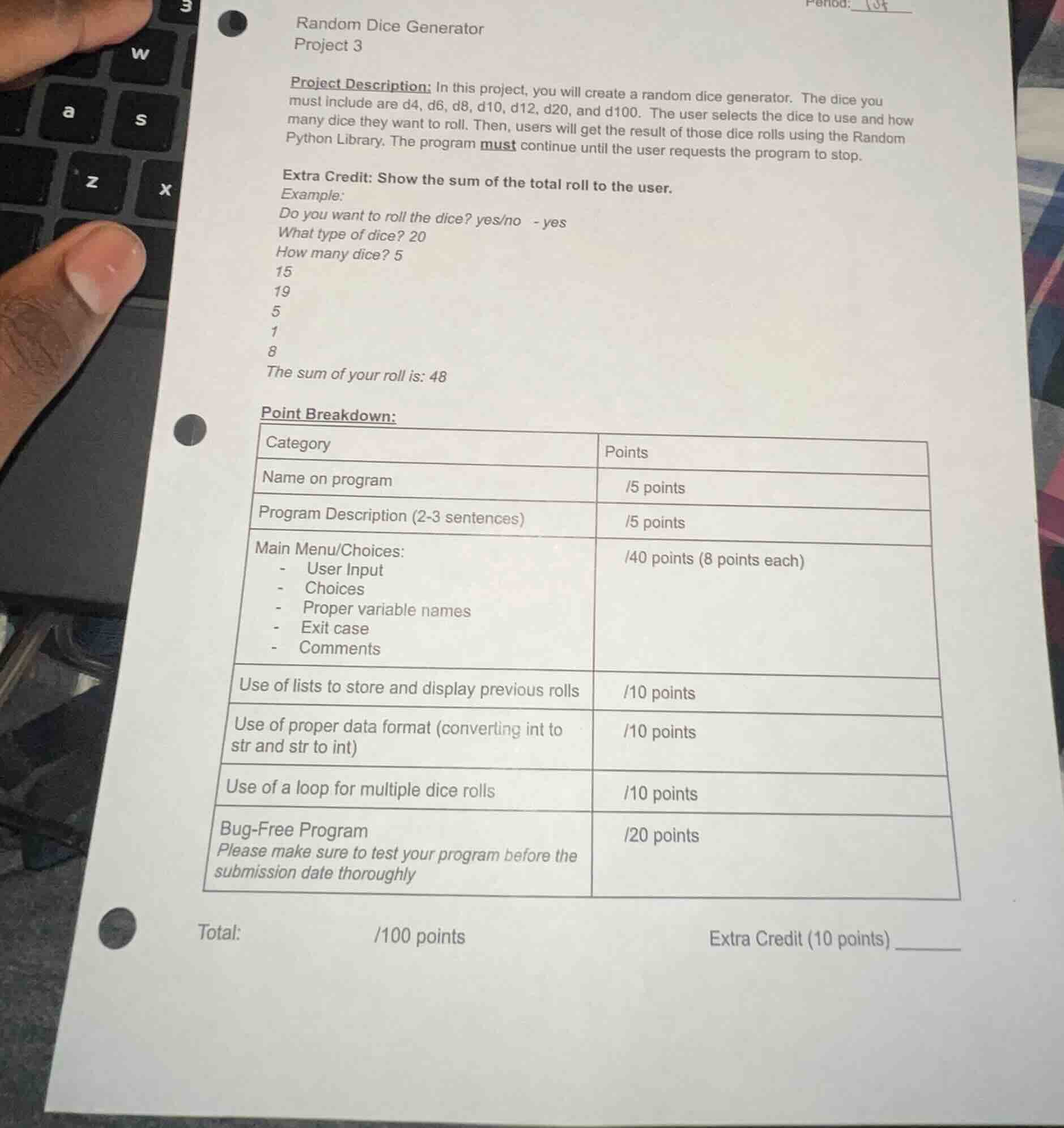
random dice generator
project 3
project description: in this project, you will create a random dice generator. the dice you must include are d4, d6, d8, d10, d12, d20, and d100. the user selects the dice to use and how many dice they want to roll. then, users will get the result of those dice rolls using the random python library. the program must continue until the user requests the program to stop.
extra credit: show the sum of the total roll to the user.
example:
do you want to roll the dice? yes/no - yes
what type of dice? 20
how many dice? 5
15
19
5
1
8
the sum of your roll is: 48
point breakdown:
| category | points |
|---|---|
| program description (2-3 sentences) | /5 points |
| main menu/choices:
- user input
- choices
- proper variable names
- exit case
- comments | /40 points (8 points each) |
| use of lists to store and display previous rolls | /10 points |
| use of proper data format (converting int to str and str to int) | /10 points |
| use of a loop for multiple dice rolls | /10 points |
| bug-free program
please make sure to test your program before the submission date thoroughly | /20 points |
total: /100 points extra credit (10 points) ______
To solve this problem, we will create a Python program that generates random dice rolls for different types of dice (d4, d6, d8, d10, d12, d20, d100) and allows the user to roll multiple dice. The program will continue until the user decides to stop, and it will also display the sum of the dice rolls for extra credit.
Approach
- Import Required Library: Use the
randomlibrary to generate random numbers for dice rolls. - Initialize Variables: Create a list to store the results of each dice roll and a variable to control the loop (whether the user wants to continue rolling dice).
- Main Loop: Continuously prompt the user if they want to roll the dice. If they do, ask for the type of dice and the number of dice to roll.
- Dice Roll Calculation: For each dice roll, generate a random number between 1 and the number of sides on the dice (e.g., 4 for d4, 6 for d6, etc.).
- Store and Display Results: Store each roll result in a list, display the results, and calculate the sum of the rolls for extra credit.
- Exit Case: Allow the user to exit the program by entering "no" when prompted if they want to roll the dice.
Solution Code
import random

def main():
    roll_results = []
    continue_rolling = True
    while continue_rolling:
        # Ask user if they want to roll the dice
        user_choice = input("Do you want to roll the dice? yes/no: ").lower()
        if user_choice == 'no':
            continue_rolling = False
            print("Thank you for using the dice generator!")
        elif user_choice == 'yes':
            # Ask for the type of dice
            dice_type = int(input("What type of dice? (4, 6, 8, 10, 12, 20, 100): "))
            # Ask for the number of dice
            num_dice = int(input("How many dice? "))
            total = 0
            current_rolls = []
            for _ in range(num_dice):
                # Generate a random roll for the dice
                roll = random.randint(1, dice_type)
                current_rolls.append(roll)
                total += roll
            roll_results.extend(current_rolls)
            # Display the results of the current roll
            for roll in current_rolls:
                print(roll)
            # Display the sum of the current roll (extra credit)
            print(f"The sum of your roll is: {total}")
        else:
            print("Invalid input. Please enter 'yes' or 'no'.")

if __name__ == "__main__":
main()- Importing the Random Library: The
randomlibrary is imported to use therandintfunction, which generates a random integer between two values (inclusive). - Initializing Variables:
roll_resultsis a list to store all the dice roll results.continue_rollingis a boolean variable to control the main loop; it starts asTrueto keep the loop running.
- Main Loop: The loop runs as long as
continue_rollingisTrue.
- The user is prompted to enter "yes" or "no" to roll the dice. If "no", the loop ends. If "yes", the user is asked for the dice type and number of dice.
- Dice Roll Calculation: For each die (based on the number of dice entered), a random number between 1 and the dice type (number of sides) is generated using
random.randint(1, dice_type). - Storing and Displaying Results: Each roll result is stored in
current_rolls(for the current set of rolls) and added toroll_results(for all rolls). The results are displayed, and the sum of the current rolls is calculated and displayed. - Exit Case: When the user enters "no",
continue_rollingis set toFalse, and the loop terminates, displaying a thank you message.
This approach ensures that the program is user-friendly, handles different dice types, allows multiple rolls, and provides the sum of the rolls for extra credit. The use of lists helps in storing and displaying previous rolls, and proper variable names and comments make the code readable and maintainable.

Snap & solve any problem in the app
Get step-by-step solutions on Sovi AI
Photo-based solutions with guided steps
Explore more problems and detailed explanations
- Importing the Random Library: The
randomlibrary is imported to use therandintfunction, which generates a random integer between two values (inclusive). - Initializing Variables:
roll_resultsis a list to store all the dice roll results.continue_rollingis a boolean variable to control the main loop; it starts asTrueto keep the loop running.
- Main Loop: The loop runs as long as
continue_rollingisTrue.
- The user is prompted to enter "yes" or "no" to roll the dice. If "no", the loop ends. If "yes", the user is asked for the dice type and number of dice.
- Dice Roll Calculation: For each die (based on the number of dice entered), a random number between 1 and the dice type (number of sides) is generated using
random.randint(1, dice_type). - Storing and Displaying Results: Each roll result is stored in
current_rolls(for the current set of rolls) and added toroll_results(for all rolls). The results are displayed, and the sum of the current rolls is calculated and displayed. - Exit Case: When the user enters "no",
continue_rollingis set toFalse, and the loop terminates, displaying a thank you message.
This approach ensures that the program is user-friendly, handles different dice types, allows multiple rolls, and provides the sum of the rolls for extra credit. The use of lists helps in storing and displaying previous rolls, and proper variable names and comments make the code readable and maintainable.