QUESTION IMAGE
Question
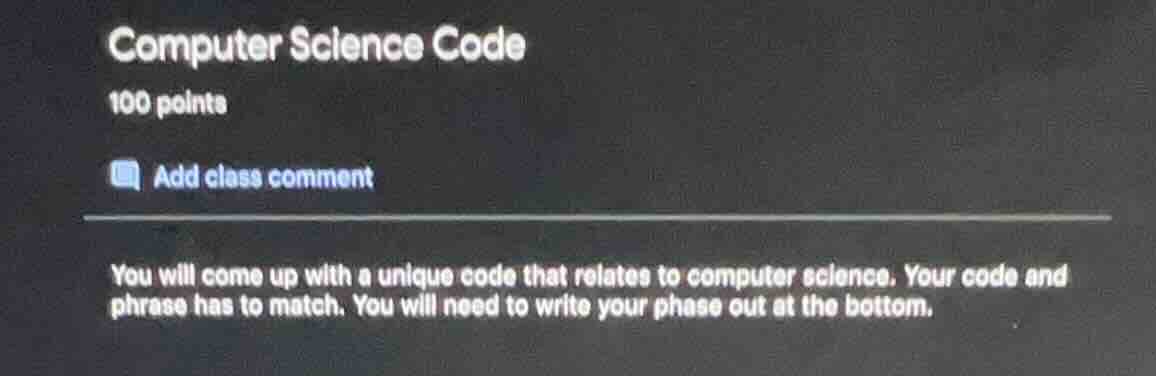
computer science code
100 points
add class comment
you will come up with a unique code that relates to computer science. your code and phrase has to match. you will need to write your phase out at the bottom.
To create a unique computer science - related code with a matching phrase, we can use a simple Python function that encrypts a word (the phrase) using a basic Caesar cipher (shifting each letter by a fixed number, here 3).
Step 1: Define the function for the Caesar cipher
We'll write a Python function that takes a word (the phrase) and a shift value (we'll use 3) and returns the encrypted word (the code).
def caesar_cipher(phrase, shift):
    result = ""
    for char in phrase:
        if char.isalpha():
            ascii_offset = ord('a') if char.islower() else ord('A')
            new_char = chr((ord(char) - ascii_offset + shift) % 26 + ascii_offset)
            result += new_char
        else:
            result += char
    return result
Step 2: Choose a phrase and generate the code
Let's choose the phrase "Hello World". Now we'll use our function to generate the code.
phrase = "Hello World"
shift = 3
code = caesar_cipher(phrase, shift)
print("Code:", code)
print("Phrase:", phrase)
When we run this code, for the phrase "Hello World", the code (encrypted text) will be "Khoor Zruog".
If we want to use a different programming language, for example, in Java:
Step 1: Create a class with the cipher method
public class CipherExample {
    public static String caesarCipher(String phrase, int shift) {
        StringBuilder result = new StringBuilder();
        for (char c : phrase.toCharArray()) {
            if (Character.isLetter(c)) {
                int asciiOffset = Character.isLowerCase(c)? 'a' : 'A';
                char newChar = (char) (((c - asciiOffset + shift) % 26) + asciiOffset);
                result.append(newChar);
            } else {
                result.append(c);
            }
        }
        return result.toString();
    }

    public static void main(String[] args) {
        String phrase = "Hello World";
        int shift = 3;
        String code = caesarCipher(phrase, shift);
        System.out.println("Code: " + code);
        System.out.println("Phrase: " + phrase);
    }
}
When we run this Java program, we'll also get the code "Khoor Zruog" for the phrase "Hello World".
Another example could be a simple Python function to reverse a string (the phrase) as a form of "coding" the phrase.
Step 1: Define the reverse function
def reverse_string(phrase):
    return phrase[::-1]
Step 2: Choose a phrase and generate the code
Let's take the phrase "Python is fun".
phrase = "Python is fun"
code = reverse_string(phrase)
print("Code:", code)
print("Phrase:", phrase)
When we run this, the code will be "nuf si nohtyP" and the phrase is "Python is fun".
If we want to use a more complex concept like a simple binary - to - decimal converter (where the phrase could be a description of the operation), here's a Python function:
Step 1: Define the binary - to - decimal conversion function
def binary_to_decimal(binary_str):
    decimal = 0
    for digit in binary_str:
        decimal = decimal * 2 + int(digit)
    return decimal
Step 2: Choose a binary string (code) and the corresponding phrase
Let's take the binary string "1010" (code) and the phrase "Convert binary 1010 to decimal".
binary_str = "1010"
decimal_value = binary_to_decimal(binary_str)
print("Code (Binary):", binary_str)
print("Phrase:", "Convert binary " + binary_str + " to decimal, result is " + str(decimal_value))
When we run this, the decimal value of "1010" is 10, and the phrase describes the operation of converting the binar…

Snap & solve any problem in the app
Get step-by-step solutions on Sovi AI
Photo-based solutions with guided steps
Explore more problems and detailed explanations
To create a unique computer science - related code with a matching phrase, we can use a simple Python function that encrypts a word (the phrase) using a basic Caesar cipher (shifting each letter by a fixed number, here 3).
Step 1: Define the function for the Caesar cipher
We'll write a Python function that takes a word (the phrase) and a shift value (we'll use 3) and returns the encrypted word (the code).
def caesar_cipher(phrase, shift):
    result = ""
    for char in phrase:
        if char.isalpha():
            ascii_offset = ord('a') if char.islower() else ord('A')
            new_char = chr((ord(char) - ascii_offset + shift) % 26 + ascii_offset)
            result += new_char
        else:
            result += char
    return result
Step 2: Choose a phrase and generate the code
Let's choose the phrase "Hello World". Now we'll use our function to generate the code.
phrase = "Hello World"
shift = 3
code = caesar_cipher(phrase, shift)
print("Code:", code)
print("Phrase:", phrase)
When we run this code, for the phrase "Hello World", the code (encrypted text) will be "Khoor Zruog".
If we want to use a different programming language, for example, in Java:
Step 1: Create a class with the cipher method
public class CipherExample {
    public static String caesarCipher(String phrase, int shift) {
        StringBuilder result = new StringBuilder();
        for (char c : phrase.toCharArray()) {
            if (Character.isLetter(c)) {
                int asciiOffset = Character.isLowerCase(c)? 'a' : 'A';
                char newChar = (char) (((c - asciiOffset + shift) % 26) + asciiOffset);
                result.append(newChar);
            } else {
                result.append(c);
            }
        }
        return result.toString();
    }

    public static void main(String[] args) {
        String phrase = "Hello World";
        int shift = 3;
        String code = caesarCipher(phrase, shift);
        System.out.println("Code: " + code);
        System.out.println("Phrase: " + phrase);
    }
}
When we run this Java program, we'll also get the code "Khoor Zruog" for the phrase "Hello World".
Another example could be a simple Python function to reverse a string (the phrase) as a form of "coding" the phrase.
Step 1: Define the reverse function
def reverse_string(phrase):
    return phrase[::-1]
Step 2: Choose a phrase and generate the code
Let's take the phrase "Python is fun".
phrase = "Python is fun"
code = reverse_string(phrase)
print("Code:", code)
print("Phrase:", phrase)
When we run this, the code will be "nuf si nohtyP" and the phrase is "Python is fun".
If we want to use a more complex concept like a simple binary - to - decimal converter (where the phrase could be a description of the operation), here's a Python function:
Step 1: Define the binary - to - decimal conversion function
def binary_to_decimal(binary_str):
    decimal = 0
    for digit in binary_str:
        decimal = decimal * 2 + int(digit)
    return decimal
Step 2: Choose a binary string (code) and the corresponding phrase
Let's take the binary string "1010" (code) and the phrase "Convert binary 1010 to decimal".
binary_str = "1010"
decimal_value = binary_to_decimal(binary_str)
print("Code (Binary):", binary_str)
print("Phrase:", "Convert binary " + binary_str + " to decimal, result is " + str(decimal_value))
When we run this, the decimal value of "1010" is 10, and the phrase describes the operation of converting the binary code "1010" to decimal.