QUESTION IMAGE
Question
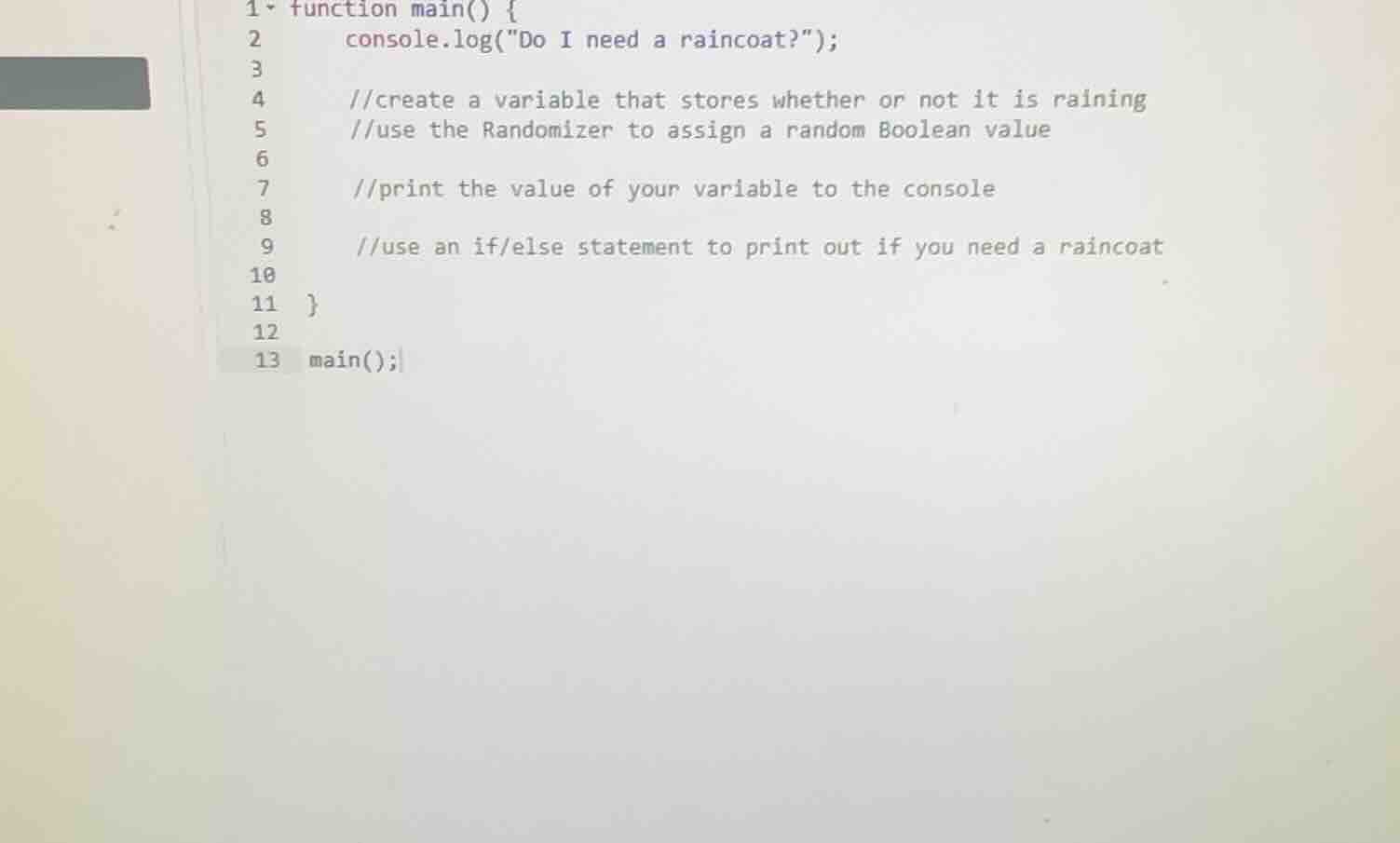
1 function main() {
2 console.log(\do i need a raincoat?\);
3
4 //create a variable that stores whether or not it is raining
5 //use the randomizer to assign a random boolean value
6
7 //print the value of your variable to the console
8
9 //use an if/else statement to print out if you need a raincoat
10
11 }
12
13 main();
To solve this problem, we need to write a JavaScript function that determines if a raincoat is needed based on a random Boolean value (representing whether it is raining or not). Here's the step-by-step breakdown:
Step 1: Define the main function
We start by defining the main function which will contain all our code.
function main() {Step 2: Print the initial question
We print the initial question "Do I need a raincoat?" to the console.
console.log("Do I need a raincoat?");Step 3: Create a variable to store if it's raining
We create a variable isRaining and assign it a random Boolean value. In JavaScript, we can use Math.random() to generate a random number between 0 (inclusive) and 1 (exclusive). If the number is less than 0.5, we consider it false (not raining), otherwise true (raining).
let isRaining = Math.random() < 0.5;Step 4: Print the value of the isRaining variable
We print the value of the isRaining variable to the console to see the random Boolean value.
console.log("Is it raining? " + isRaining);Step 5: Use an if/else statement to determine if a raincoat is needed
We use an if/else statement to check the value of isRaining. If isRaining is true, we print that a raincoat is needed. Otherwise, we print that it's not needed.
if (isRaining) {
    console.log("Yes, you need a raincoat.");
} else {
    console.log("No, you don't need a raincoat.");
}
Step 6: Close the main function
We close the main function.
}Step 7: Call the main function
We call the main function to execute the code.
main();Putting it all together, the complete code is:
function main() {
    console.log("Do I need a raincoat?");
    let isRaining = Math.random() < 0.5;
    console.log("Is it raining? " + isRaining);
    if (isRaining) {
        console.log("Yes, you need a raincoat.");
    } else {
        console.log("No, you don't need a raincoat.");
    }
}

main();
When you run this code, it will:
- Print the initial question.
- Print a random Boolean value indicating if it's raining.
- Print whether a raincoat is needed based on the random value.
The output will vary each time you run the code because the value of isRaining is randomly generated. For example, one possible output could be:
Do I need a raincoat?
Is it raining? true
Yes, you need a raincoat.
Or:
Do I need a raincoat?
Is it raining? false
No, you don't need a raincoat.
Snap & solve any problem in the app
Get step-by-step solutions on Sovi AI
Photo-based solutions with guided steps
Explore more problems and detailed explanations
To solve this problem, we need to write a JavaScript function that determines if a raincoat is needed based on a random Boolean value (representing whether it is raining or not). Here's the step-by-step breakdown:
Step 1: Define the main function
We start by defining the main function which will contain all our code.
function main() {Step 2: Print the initial question
We print the initial question "Do I need a raincoat?" to the console.
console.log("Do I need a raincoat?");Step 3: Create a variable to store if it's raining
We create a variable isRaining and assign it a random Boolean value. In JavaScript, we can use Math.random() to generate a random number between 0 (inclusive) and 1 (exclusive). If the number is less than 0.5, we consider it false (not raining), otherwise true (raining).
let isRaining = Math.random() < 0.5;Step 4: Print the value of the isRaining variable
We print the value of the isRaining variable to the console to see the random Boolean value.
console.log("Is it raining? " + isRaining);Step 5: Use an if/else statement to determine if a raincoat is needed
We use an if/else statement to check the value of isRaining. If isRaining is true, we print that a raincoat is needed. Otherwise, we print that it's not needed.
if (isRaining) {
    console.log("Yes, you need a raincoat.");
} else {
    console.log("No, you don't need a raincoat.");
}
Step 6: Close the main function
We close the main function.
}Step 7: Call the main function
We call the main function to execute the code.
main();Putting it all together, the complete code is:
function main() {
    console.log("Do I need a raincoat?");
    let isRaining = Math.random() < 0.5;
    console.log("Is it raining? " + isRaining);
    if (isRaining) {
        console.log("Yes, you need a raincoat.");
    } else {
        console.log("No, you don't need a raincoat.");
    }
}

main();
When you run this code, it will:
- Print the initial question.
- Print a random Boolean value indicating if it's raining.
- Print whether a raincoat is needed based on the random value.
The output will vary each time you run the code because the value of isRaining is randomly generated. For example, one possible output could be:
Do I need a raincoat?
Is it raining? true
Yes, you need a raincoat.
Or:
Do I need a raincoat?
Is it raining? false
No, you don't need a raincoat.