QUESTION IMAGE
Question
identify motherboard components (part 1)
motherboard image
component labels: z97 chipset, sata ports, m.2 socket, apu (accelerated processing unit) socket, cpu socket, expansion slots, ddr3 memory slots, external ports
Brief Explanations
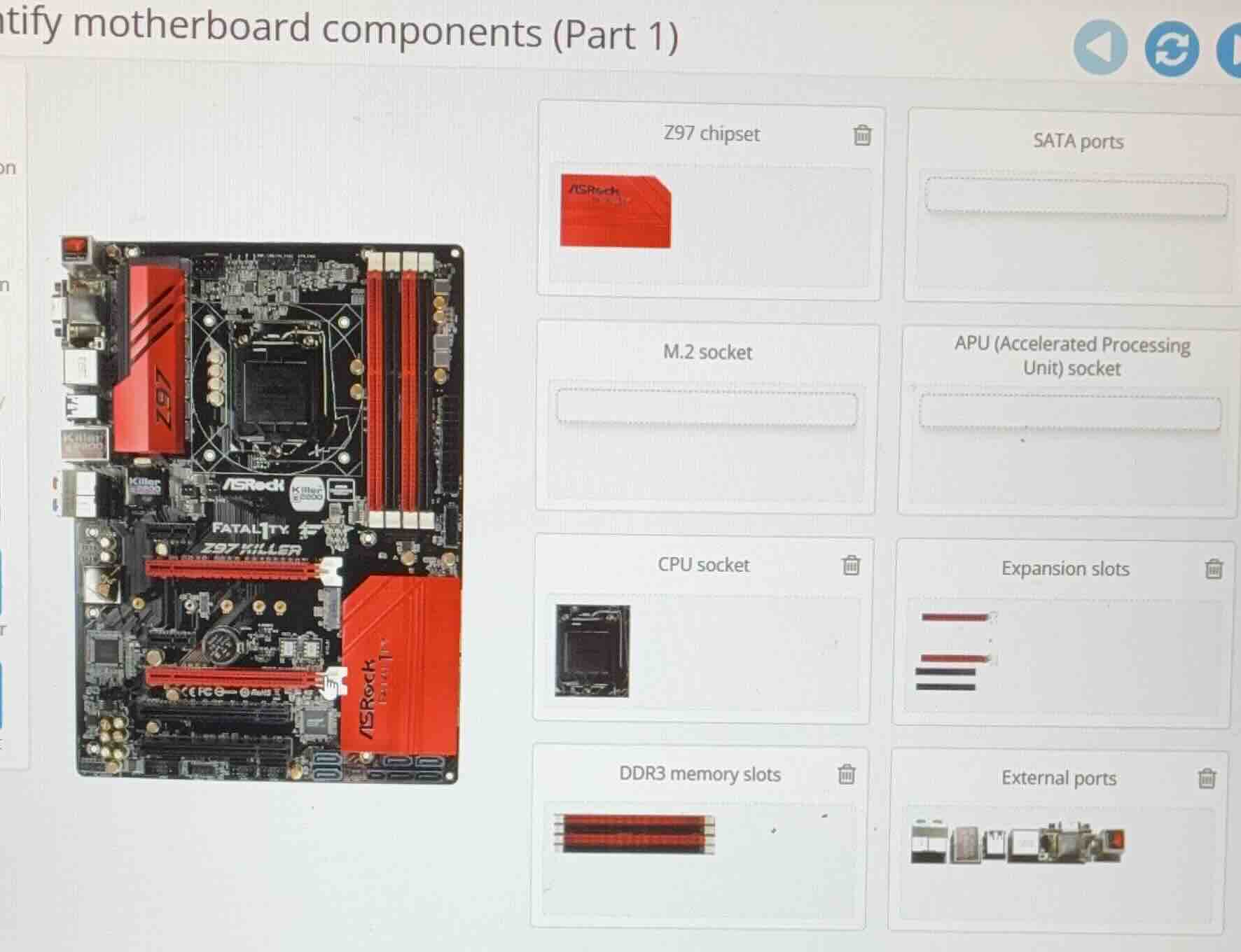
Match each motherboard component label to its corresponding visual on the ASRock Z97 Killer motherboard:
- Z97 chipset: The large red heatshield on the left side marked "Z97" is the Z97 chipset cooling cover, matching the red labeled component.
- CPU socket: The central square, empty socket is the CPU socket, matching the black square component.
- DDR3 memory slots: The long, red dual-channel slots on the upper right are DDR3 memory slots, matching the red striped component.
- External ports: The row of ports on the far left edge (USB, audio, etc.) are external ports, matching the mixed port visual.
- Expansion slots: The red and black long slots near the bottom are expansion slots (PCIe), matching the stacked striped component.
- SATA ports: The small blue horizontal ports at the bottom right are SATA ports.
- M.2 socket: Located near the SATA ports, the small dedicated slot is the M.2 socket.
- APU socket: This motherboard uses an Intel CPU socket, so there is no APU (AMD) socket present here.

Snap & solve any problem in the app
Get step-by-step solutions on Sovi AI
Photo-based solutions with guided steps
Explore more problems and detailed explanations
- Z97 chipset → Left red "Z97" heatshield
- CPU socket → Central square socket
- DDR3 memory slots → Upper right red long slots
- External ports → Far left edge ports
- Expansion slots → Lower red/black long slots
- SATA ports → Bottom right blue horizontal ports
- M.2 socket → Small slot near SATA ports
- APU (Accelerated Processing Unit) socket → Not present on this Intel motherboard