QUESTION IMAGE
Question
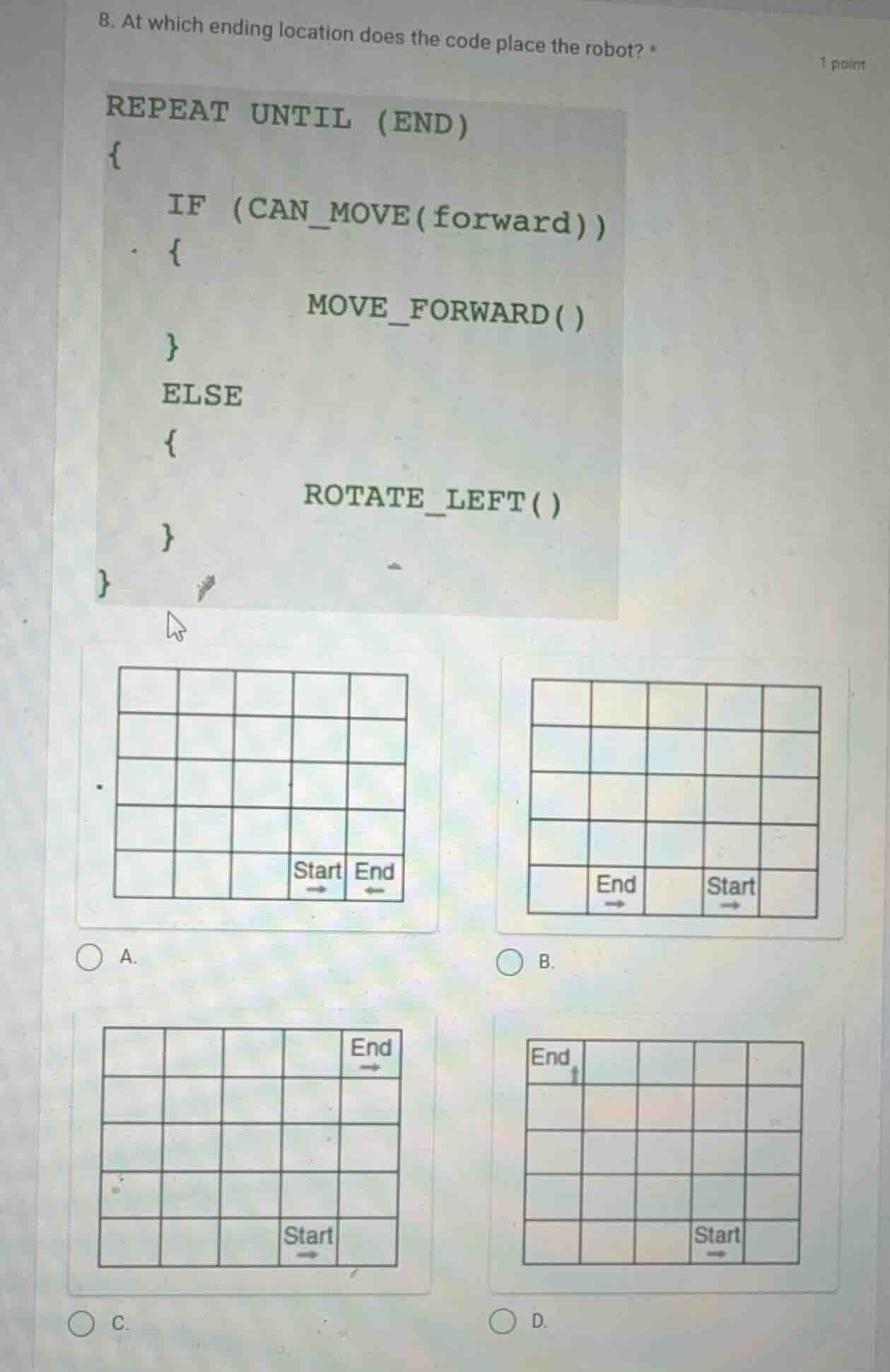
- at which ending location does the code place the robot? *
repeat until (end)
{
if (can_move(forward))
{
move_forward()
}
else
{
rotate_left()
}
}
a. grid with start and end as shown
b. grid with start and end as shown
c. grid with start and end as shown
d. grid with start and end as shown
Step1: Analyze the code logic
The code is a loop (REPEAT UNTIL (END)) that checks if the robot can move forward. If it can, it moves forward; otherwise, it rotates left. We need to track the robot's movement from the start position (with the arrow direction) in each option.
Step2: Analyze Option A
In Option A, the start is at the 4th column (from left) of the bottom row, facing right. The end is adjacent to the right of start. But the robot's movement: when it starts, it can move forward (right) to the end? Wait, no—wait, the code's loop: let's think about the grid. Wait, maybe I misread. Wait, the start in A: start is at (row 5, column 4) (assuming rows from top as 1, bottom as 5), facing right. The end is (row 5, column 5). But the code: when it starts, CAN_MOVE(forward) (right) is true (since end is right), so it moves forward to end. But wait, the loop is REPEAT UNTIL (END)—wait, maybe the "END" condition is when it reaches the end cell? Wait, maybe the code's loop runs until it reaches the end. Wait, no, the code's logic: the robot moves forward if possible, else rotates left. Let's check each option's start and end positions with the movement.
Wait, maybe the correct approach is to simulate the robot's movement:
- Start direction: in each start cell, the arrow is the initial direction (e.g., in A, start arrow is right; in B, start arrow is right; in C, start arrow is right; in D, start arrow is right? Wait, no, D's start arrow is right? Wait, D's start is at bottom row, 4th column, arrow right. End is at top row, 1st column, arrow up. Wait, no, let's re-express each option:
Option A:
- Grid: 5x5 (rows 1 - 5, top to bottom; columns 1 - 5, left to right)
- Start: row 5, column 4, direction right (arrow →)
- End: row 5, column 5, direction ← (arrow ←)
- Movement: Robot starts at (5,4), direction →.
CAN_MOVE(forward)(right) is true (column 5 is end), soMOVE_FORWARD()to (5,5) (end). So loop ends? But the code's loop isREPEAT UNTIL (END)—maybe "END" is the end cell. So in A, moving forward once reaches end. But is that correct? Wait, maybe the code's loop continues until it can't move forward, but no, the loop isREPEAT UNTIL (END), so maybe "END" is a condition (like reaching the end cell). Alternatively, maybe the robot's path:
Wait, maybe I made a mistake. Let's check Option C:
Option C:
- Start: row 5, column 4, direction →
- End: row 1, column 5, direction →
- Movement: Robot starts at (5,4), direction →. Can move forward to (5,5) (column 5, row 5). Now,
CAN_MOVE(forward)(right) is false (column 5 is max), soROTATE_LEFT()(direction becomes up). Now,CAN_MOVE(forward)(up) is true (row 4, column 5). Move up to (4,5). ThenCAN_MOVE(forward)(up) to (3,5), (2,5), (1,5) (end). So it moves up until it reaches row 1, column 5 (end). That matches Option C's end position.
Wait, let's simulate Option C:
- Start: (5,4), direction →.
CAN_MOVE(forward)(→): column 5 is valid (column 5 ≤ 5), so move to (5,5).
- Now at (5,5), direction →.
CAN_MOVE(forward)(→): column 6 is invalid, soROTATE_LEFT()(direction becomes ↑).
- Now at (5,5), direction ↑.
CAN_MOVE(forward)(↑): row 4, column 5 is valid, move to (4,5).
- At (4,5), direction ↑: move to (3,5).
- At (3,5), direction ↑: move to (2,5).
- At (2,5), direction ↑: move to (1,5) (end cell, since end is at (1,5) with → arrow? Wait, Option C's end is at row 1, column 5, direction →. So when the robot reaches (1,5), the loop ends (since it's the end location). So this matches Option C's end position.
Now check other options…

Snap & solve any problem in the app
Get step-by-step solutions on Sovi AI
Photo-based solutions with guided steps
Explore more problems and detailed explanations
C. The grid where Start is at the bottom row (row 5), 4th column (column 4), direction right, and End is at the top row (row 1), 5th column (column 5), direction right.