QUESTION IMAGE
Question
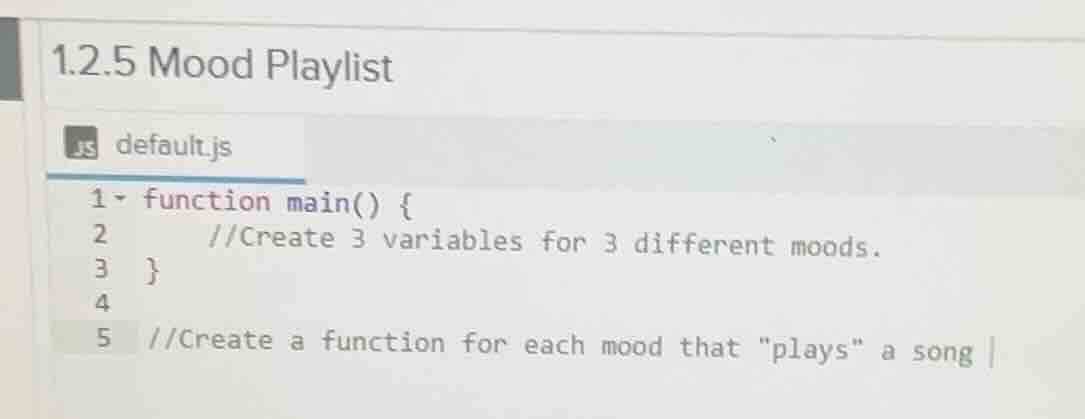
1.2.5 mood playlist
js default.js
1 function main() {
2 //create 3 variables for 3 different moods.
3 }
4
5 //create a function for each mood that \plays\ a song
To solve this programming task (in JavaScript) for the Mood Playlist:
Step 1: Declare Variables for Moods
We need to create 3 variables to represent different moods. Let's use let (or var/const depending on scope needs) to declare them. For example, we can have moods like "happy", "sad", "energetic".
function main() {
    // Create 3 variables for 3 different moods.
    let happyMood, sadMood, energeticMood;
    // You can also initialize them with values if needed, e.g.,
    // let happyMood = "Happy";
    // let sadMood = "Sad";
    // let energeticMood = "Energetic";
}
Step 2: Create Functions for Each Mood
We will create a function for each mood that "plays" a song (for simplicity, we can just log a message indicating a song is playing for that mood).
// Function for happy mood
function playHappySong() {
    console.log("Playing a happy song!");
}

// Function for sad mood
function playSadSong() {
    console.log("Playing a sad song!");
}

// Function for energetic mood
function playEnergeticSong() {
    console.log("Playing an energetic song!");
}

function main() {
    let happyMood, sadMood, energeticMood;
    // You can call the functions to "play" the songs
    playHappySong();
    playSadSong();
    playEnergeticSong();
}

// Call the main function to execute the code
main();
If you want to associate the mood variables with the functions (e.g., have the variable hold the function reference), you can do:
function playHappySong() {
    console.log("Playing a happy song!");
}

function playSadSong() {
    console.log("Playing a sad song!");
}

function playEnergeticSong() {
    console.log("Playing an energetic song!");
}

function main() {
    let happyMood = playHappySong;
    let sadMood = playSadSong;
    let energeticMood = playEnergeticSong;

    // Now you can call the functions using the mood variables
    happyMood();
    sadMood();
    energeticMood();
}

main();
This code first declares variables for different moods and then creates functions that simulate playing a song for each mood. The main function can be used to orchestrate using these moods and their respective song - playing functions.
If you run this code in a JavaScript environment (like a browser console or Node.js), it will log the messages indicating that songs for each mood are being played.

Snap & solve any problem in the app
Get step-by-step solutions on Sovi AI
Photo-based solutions with guided steps
Explore more problems and detailed explanations
To solve this programming task (in JavaScript) for the Mood Playlist:
Step 1: Declare Variables for Moods
We need to create 3 variables to represent different moods. Let's use let (or var/const depending on scope needs) to declare them. For example, we can have moods like "happy", "sad", "energetic".
function main() {
    // Create 3 variables for 3 different moods.
    let happyMood, sadMood, energeticMood;
    // You can also initialize them with values if needed, e.g.,
    // let happyMood = "Happy";
    // let sadMood = "Sad";
    // let energeticMood = "Energetic";
}
Step 2: Create Functions for Each Mood
We will create a function for each mood that "plays" a song (for simplicity, we can just log a message indicating a song is playing for that mood).
// Function for happy mood
function playHappySong() {
    console.log("Playing a happy song!");
}

// Function for sad mood
function playSadSong() {
    console.log("Playing a sad song!");
}

// Function for energetic mood
function playEnergeticSong() {
    console.log("Playing an energetic song!");
}

function main() {
    let happyMood, sadMood, energeticMood;
    // You can call the functions to "play" the songs
    playHappySong();
    playSadSong();
    playEnergeticSong();
}

// Call the main function to execute the code
main();
If you want to associate the mood variables with the functions (e.g., have the variable hold the function reference), you can do:
function playHappySong() {
    console.log("Playing a happy song!");
}

function playSadSong() {
    console.log("Playing a sad song!");
}

function playEnergeticSong() {
    console.log("Playing an energetic song!");
}

function main() {
    let happyMood = playHappySong;
    let sadMood = playSadSong;
    let energeticMood = playEnergeticSong;

    // Now you can call the functions using the mood variables
    happyMood();
    sadMood();
    energeticMood();
}

main();
This code first declares variables for different moods and then creates functions that simulate playing a song for each mood. The main function can be used to orchestrate using these moods and their respective song - playing functions.
If you run this code in a JavaScript environment (like a browser console or Node.js), it will log the messages indicating that songs for each mood are being played.