QUESTION IMAGE
Question
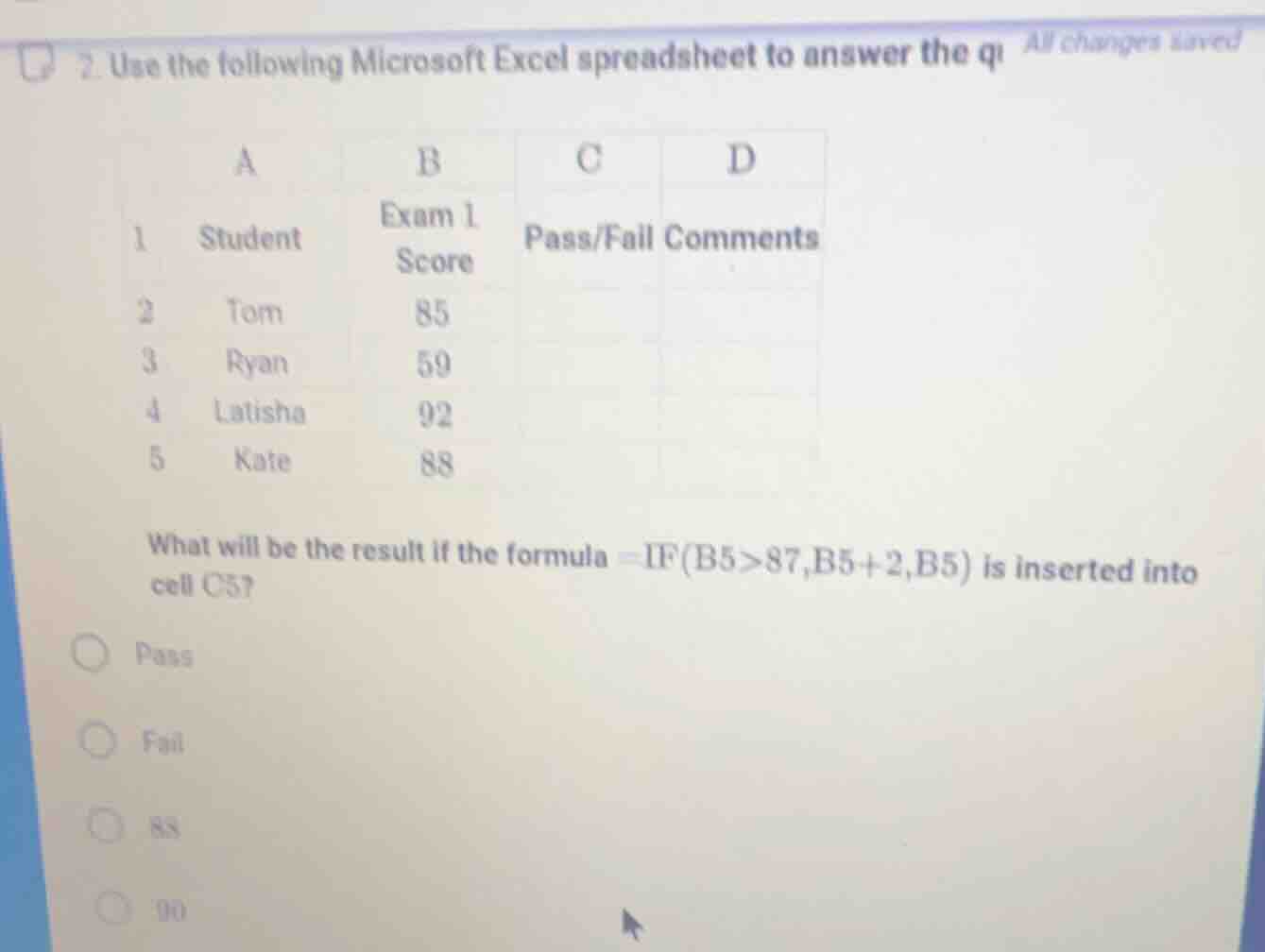
- use the following microsoft excel spreadsheet to answer the qi all changes saved
a b c d
1 student exam 1 score pass/fail comments
2 tom 85
3 ryan 59
4 latisha 92
5 kate 88
what will be the result if the formula =if(b5>87,b5+2,b5) is inserted into cell c5?
○ pass
○ fail
○ 88
○ 90
Step1: Analyze the IF formula
The formula is =IF(B5>87,B5+2,B5). We first check the condition B5>87. B5 contains Kate's score, which is 88.
Step2: Evaluate the condition
Since \( 88 > 87 \) is true, we use the first part of the IF statement, which is \( B5 + 2 \).
Step3: Calculate the result
Substitute B5 (88) into \( B5 + 2 \), so \( 88 + 2 = 90 \).

Snap & solve any problem in the app
Get step-by-step solutions on Sovi AI
Photo-based solutions with guided steps
Explore more problems and detailed explanations
90