QUESTION IMAGE
Question
describing how to format cells in a table
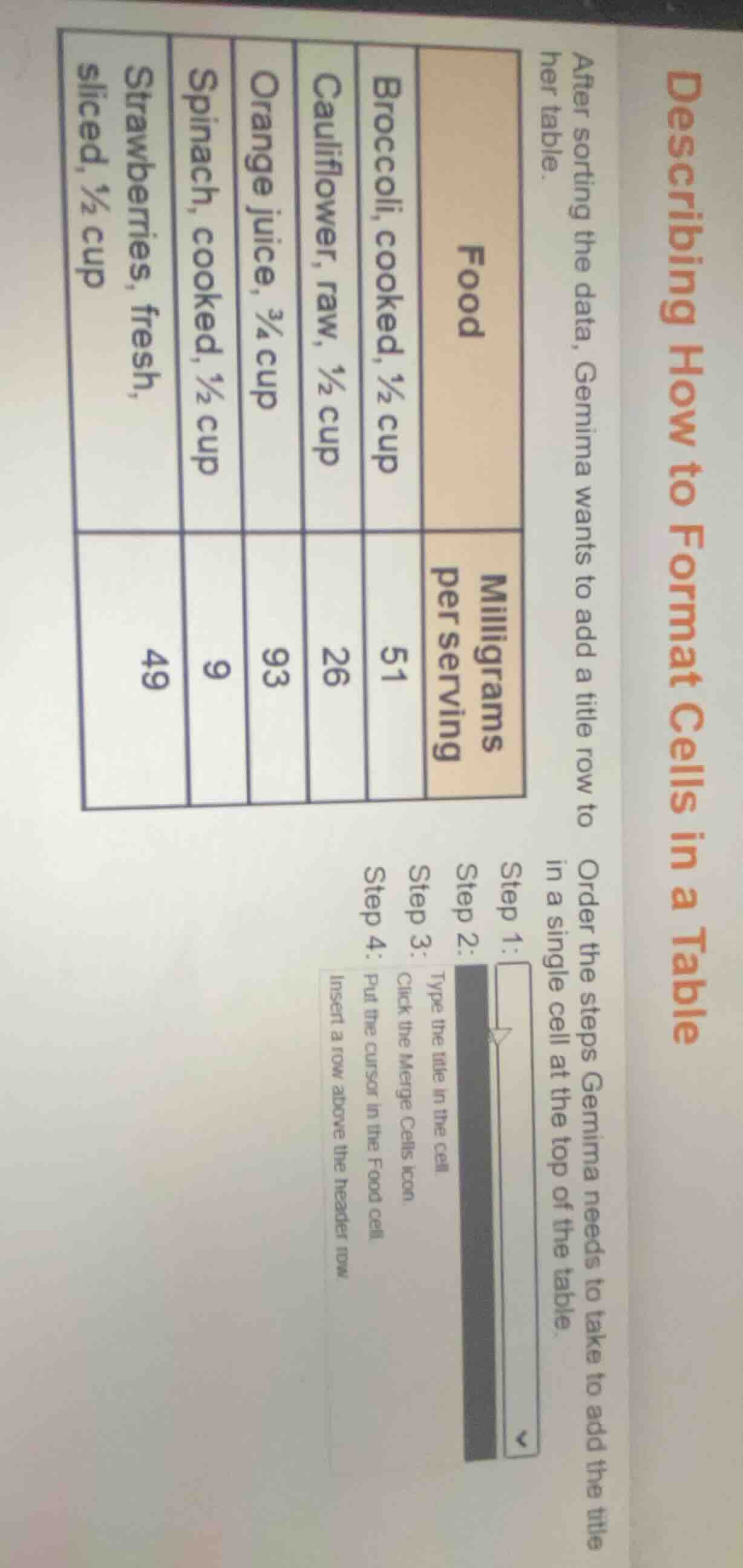
after sorting the data, gemima wants to add a title row to her table.
| food | milligrams per serving | ---- | ---- | broccoli, cooked, ½ cup | 51 | cauliflower, raw, ½ cup | 26 | orange juice, ¾ cup | 93 | spinach, cooked, ½ cup | 9 | strawberries, fresh, sliced, ½ cup | 49 | order the steps gemima needs to take to add the title in a single cell at the top of the table. |
step 1:
step 2: type the title in the cell
step 3: click the merge cells icon
step 4: put the cursor in the food cell
insert a row above the header row
Brief Explanations
To add a merged title row at the top of the table, first insert a new row above the header. Then position the cursor, merge the cells in the new row, and finally type the title.

Snap & solve any problem in the app
Get step-by-step solutions on Sovi AI
Photo-based solutions with guided steps
Explore more problems and detailed explanations
Step 1: Insert a row above the header row.
Step 2: Put the cursor in the Food cell.
Step 3: Click the Merge Cells icon.
Step 4: Type the title in the cell.