QUESTION IMAGE
Question
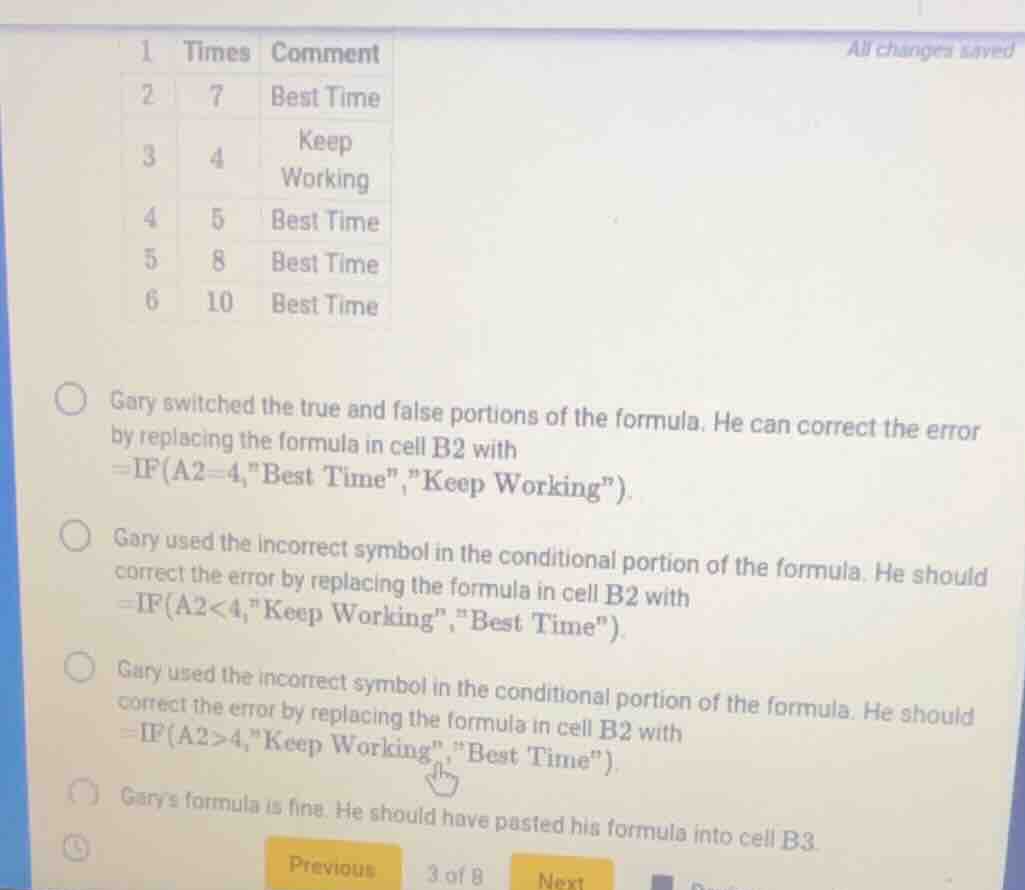
1 times comment
2 7 best time
3 4 keep working
4 5 best time
5 8 best time
6 10 best time
gary switched the true and false portions of the formula. he can correct the error by replacing the formula in cell b2 with =if(a2=4,\best time\,\keep working\).
gary used the incorrect symbol in the conditional portion of the formula. he should correct the error by replacing the formula in cell b2 with =if(a2<4,\keep working\,\best time\).
gary used the incorrect symbol in the conditional portion of the formula. he should correct the error by replacing the formula in cell b2 with =if(a2>4,\keep working\,\best time\).
garys formula is fine. he should have pasted his formula into cell b3.
We analyze the IF formula logic. The correct scenario should have the "Best Time" for values (assuming the intended logic is: if A2 = 4, "Keep Working" and else "Best Time" was wrong, or vice - versa. Looking at the first option: Gary switched true and false. The formula =IF(A2 = 4,"Best Time","Keep Working") was wrong, and correcting by switching (so when A2 = 4, maybe it should be "Keep Working" and else "Best Time" – but in the table, A3 is 4 with "Keep Working", A2 is 7 with "Best Time". So the first option's correction: if A2 = 4, "Best Time" was wrong, so switching true and false (making it =IF(A2 = 4,"Best Time","Keep Working") corrected? Wait, no. Wait, in the table, A3 (row 3) has value 4 and comment "Keep Working", A2 (row 2) has 7 and "Best Time", A4 (row4) has 5 and "Best Time", etc. So the intended logic is: if the time is 4 (A2 = 4? No, A3 is 4). Wait, row 3: A3 = 4, comment "Keep Working"; row 2: A2 = 7, comment "Best Time"; row4: A4 = 5, comment "Best Time"; row5: A5 = 8, comment "Best Time"; row6: A6 = 10, comment "Best Time". So the formula in B2 (row2) should check: if A2 = 4, "Keep Working", else "Best Time". But maybe Gary had the formula as =IF(A2 = 4,"Best Time","Keep Working") (which would give "Best Time" for A2 = 7, which is correct, but for A3 (4) it would give "Best Time" instead of "Keep Working"). Wait, no, B2 is row2, A2 = 7. So the first option says Gary switched true and false. So his original formula was maybe =IF(A2 = 4,"Keep Working","Best Time") but he switched them, making it =IF(A2 = 4,"Best Time","Keep Working"). To correct, he should switch them back? Wait, no, the first option's correction formula is =IF(A2 = 4,"Best Time","Keep Working")? No, wait the first option's correction is replacing with =IF(A2 = 4,"Best Time","Keep Working")? Wait, no, the first option says: "Gary switched the true and false portions of the formula. He can correct the error by replacing the formula in cell B2 with =IF(A2 = 4,"Best Time","Keep Working")". Wait, maybe the original formula was =IF(A2 = 4,"Keep Working","Best Time"), and he switched true and false to =IF(A2 = 4,"Best Time","Keep Working"). So to correct, he should switch them back? No, the first option's correction formula is =IF(A2 = 4,"Best Time","Keep Working")? Wait, no, in the table, when A is 4 (row3), the comment is "Keep Working", when A is not 4 (rows2,4,5,6), comment is "Best Time". So the correct formula for a cell (say B2) should be: if A2 = 4, "Keep Working", else "Best Time". But if Gary's formula was =IF(A2 = 4,"Best Time","Keep Working") (switched true and false), then correcting by switching them back (i.e., making the formula =IF(A2 = 4,"Best Time","Keep Working")? No, that's not switching. Wait, no: the IF function is IF(condition, value if true, value if false). So if the intended is: condition is A2 = 4, value if true is "Keep Working", value if false is "Best Time". But if Gary had value if true as "Best Time" and value if false as "Keep Working" (switched), then to correct, he should switch them, so the formula becomes =IF(A2 = 4,"Best Time","Keep Working")? No, that's the same as his wrong formula. Wait, I think I messed up. Let's check the options:
Option 1: Gary switched true and false. So original formula was =IF(condition, false_part, true_part), and he should make it =IF(condition, true_part, false_part). In the table, when A = 4 (row3), comment is "Keep Working", when A≠4, comment is "Best Time". So for cell B2 (A2 = 7≠4), comment is "Best Time" (correct). For cell B3 (A3 = 4), comment is "Keep Working" (correct). So the fo…

Snap & solve any problem in the app
Get step-by-step solutions on Sovi AI
Photo-based solutions with guided steps
Explore more problems and detailed explanations
A. Gary switched the true and false portions of the formula. He can correct the error by replacing the formula in cell B2 with =IF(A2 = 4,"Best Time","Keep Working").